Every image in a carousel, the caption, the location tag and the date.
Reels and videos
Played in the browser without the app, with the caption and the sound credit.
Likes, comments and tags
On a public post, the likes and comments are public too, and so are the photos the account is tagged in.
Inside a post
What an Instagram post viewer opens.
Every part of a public post that the app shows a visitor, in the browser and without a login.
Single photos
The image at full width, with the caption, the date and the location tag when the owner added one.
Carousels
Every slide in order, photos and videos mixed, with a marker for the slide you are on.
Reels
Short videos with sound, the caption and the audio credit, played in the browser.
Comments
The comments on a public post, with the replies under each one, in the order Instagram shows them.
Likes
The like count, unless the owner chose to hide it on that post.
Tagged photos
The tab of posts that other accounts made and tagged this account in, on a public profile.
Reading a post in a viewer
1
Open a post from the grid to see it at full size with its caption and date.
2
Swipe or use the arrows to move through the slides of a carousel.
3
Tap a reel or a video for sound.
4
Comments load under the post, and replies open under each comment.
5
The location tag names the place the owner chose, when the owner added one.
Reels viewer
Reels and videos without the app.
Reels are the part of Instagram most people meet outside the app, through a shared link. A reels viewer opens the rest of them.
01
Reels sit in their own tab
On a public profile, reels have a tab next to the grid. A reels viewer opens that tab and plays each one in the browser.
02
Sound plays in the browser
Tap the video for sound, as on a phone. The audio credit under it names the track or the original sound.
03
A play count is not a list of names
A reel shows how many times it was played. Instagram does not show the owner who played it, whether the viewer was signed in or not.
04
Longer videos play the same way
Videos posted to the grid open in the same player, with the caption and the comments under them.
Does the owner see that I played a reel?
No. Instagram shows a number of plays, never the names behind it.
Can I watch a reel from a private account?
No. Reels on a private account are closed to everyone the owner has not approved, a viewer included.
What about a reel someone sent me as a link?
A link to a public reel opens in the browser. A viewer adds the rest of the account's reels and posts beside it.
Likes and comments viewer
Reading likes and comments on a public post.
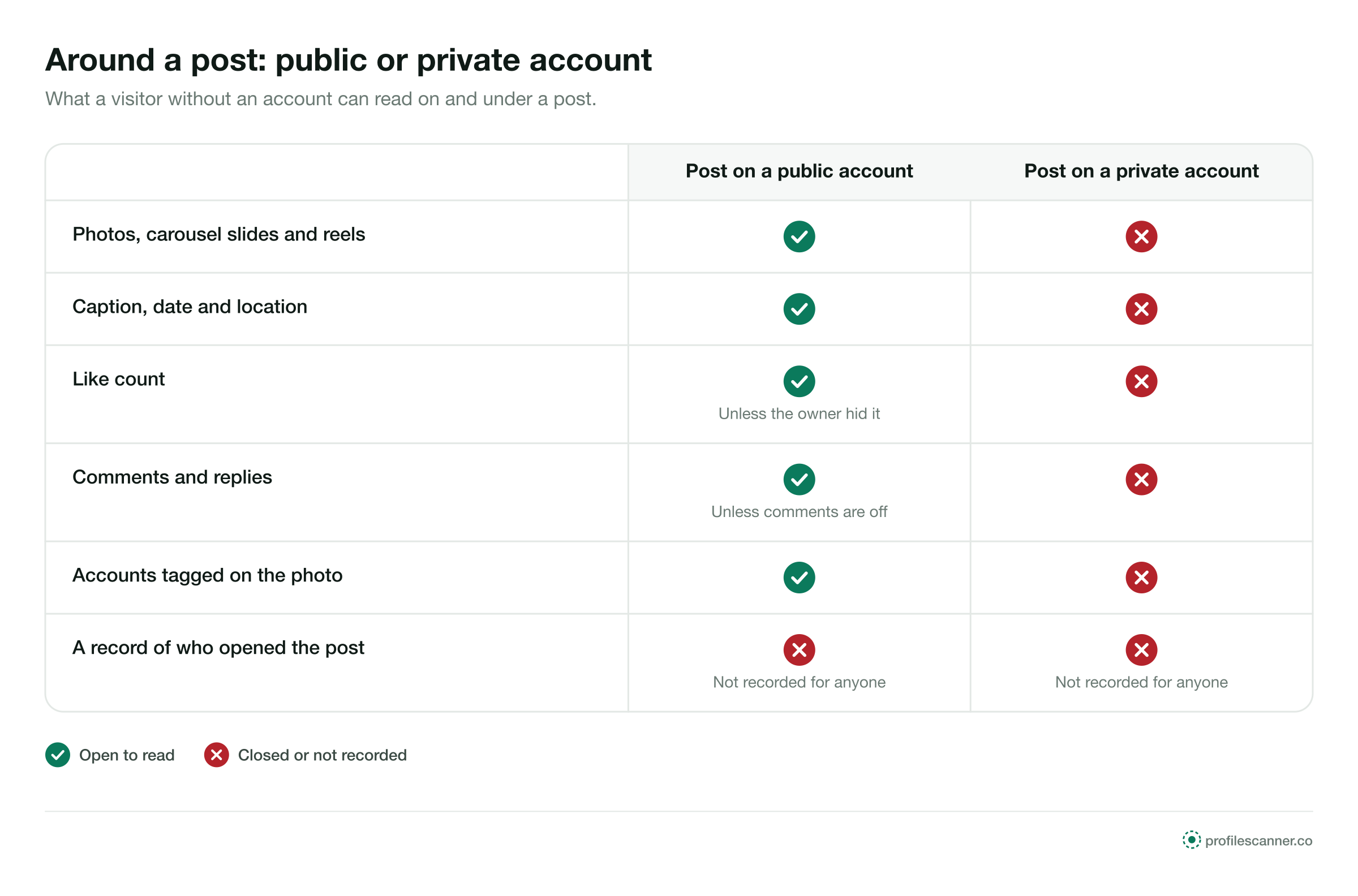
What a visitor can read around a post depends on one setting: whether the account is public.
Post on a public accountPost on a private account
Like countShown unless the owner hid itClosed
Comments and repliesShownClosed
Caption, date and locationShownClosed
Accounts tagged on the photoShownClosed
Who opened the postNot recorded for anyoneNot recorded for anyone
Can the owner see that I read the comments?
No. Reading comments is not recorded. Writing one needs an account and shows your name.
Why is the like count missing?
The owner can hide like counts on a post. When they do, no viewer shows the number.
Are deleted comments shown?
No. A viewer shows what the post shows at the moment you open it.
Why are there no comments at all?
The owner can turn comments off on a post, and then there are none to read, in the app or in a viewer.
Tagged photos viewer
Photos a public account is tagged in.
The tagged tab collects posts that other accounts made and tagged this one in. For a venue or a shop, those are photos customers posted.
What the tagged tab shows
1
The tab lists posts other accounts made and tagged this account in, newest first.
2
Only tagged posts from public accounts appear to a visitor; a tag inside a private account's post stays with its approved followers.
3
The owner can remove a tag or hide a tagged post from the profile, and the post then leaves the tab.
4
On a private account the tagged tab is closed along with the rest of the profile.
Live broadcasts
A live broadcast shows its host the accounts that join it. Watching a live from your own account puts your name in front of the host while the broadcast runs.
Who uses them
Four ordinary reasons to open a post without the app.
Posts carry the details people check before they book, buy or plan: dishes, sizes, opening hours.
Emma CarterChecking the food
Example
The situation
Emma was booking a restaurant for a birthday dinner and wanted to see the plates, not the menu text.
What they did
She opened the restaurant's tagged tab in a viewer and looked at the dishes customers had photographed that month.
Claire DuboisReading the comments
Example
The situation
Claire was about to buy a jacket from a small label and wanted to know how the sizes fit.
What they did
She read the comments under the label's public posts, where customers had asked about sizing, and chose her size from the answers.
Daniel MoreauReels for research
Example
The situation
Daniel plans social posts for a hotel and studies the reels other hotels publish.
What they did
He played public reels from three hotels on his laptop and noted their length, music and captions.
Lena HoffA carousel she needed
Example
The situation
A museum posted its new opening hours as one slide in a carousel. Lena does not use Instagram.
What they did
She opened the post in her browser, swiped to the slide with the hours, and planned her visit.
Good for, not for
What a post viewer is for.
A post viewer is good for
Seeing every slide of a carousel, with the caption and the date
Playing reels and videos without the app
Reading likes, comments and tagged photos on public posts
It is not for
Posts on a private account
Liking, commenting or saving a post
Seeing who else opened a post: Instagram does not record it
A private account's posts stay closed.
Photos, carousels, reels, likes, comments and tagged photos on a private account are shown only to followers the owner approved. No viewer changes that.
How it works
Three steps, the same for every viewer here.
1
Type the username
The public account whose posts you want to see.
@emma.carter
View anonymously
2
Open the grid
Every public post in order, each one openable.
Emma Carter@emma.carter
3
Open a post
The full image or video, the caption, the likes and the comments.
Private accounts
What stays closed.
Private accounts stay private on every viewer.
A private account shows its header and a lock to everyone the owner has not approved. No viewer on this site, and none anywhere else, opens the rest. The private accounts guide explains what is and is not possible.
Questions
Asked about posts and reels.
Short answers. Each page in this section goes deeper.
Can I see likes and comments?
On a public post, yes. Likes and comments are public, and so are the photos an account is tagged in.
Can I watch reels without the app?
Yes. Reels and videos from public accounts play in the browser.
Does the owner see that I opened a post?
No. Instagram does not record who opened a post, for anyone.
What about posts on a private account?
Closed to everyone the owner has not approved. A viewer shows the lock, nothing more.