
It starts from an account
The host goes live from the app. The broadcast runs until the host ends it.
How an Instagram live works from the audience's side: the host sees each account that joins in real time, replays exist only when the owner shares them, and a viewer opens what stays on the public profile afterwards.

Can you watch an Instagram live anonymously?
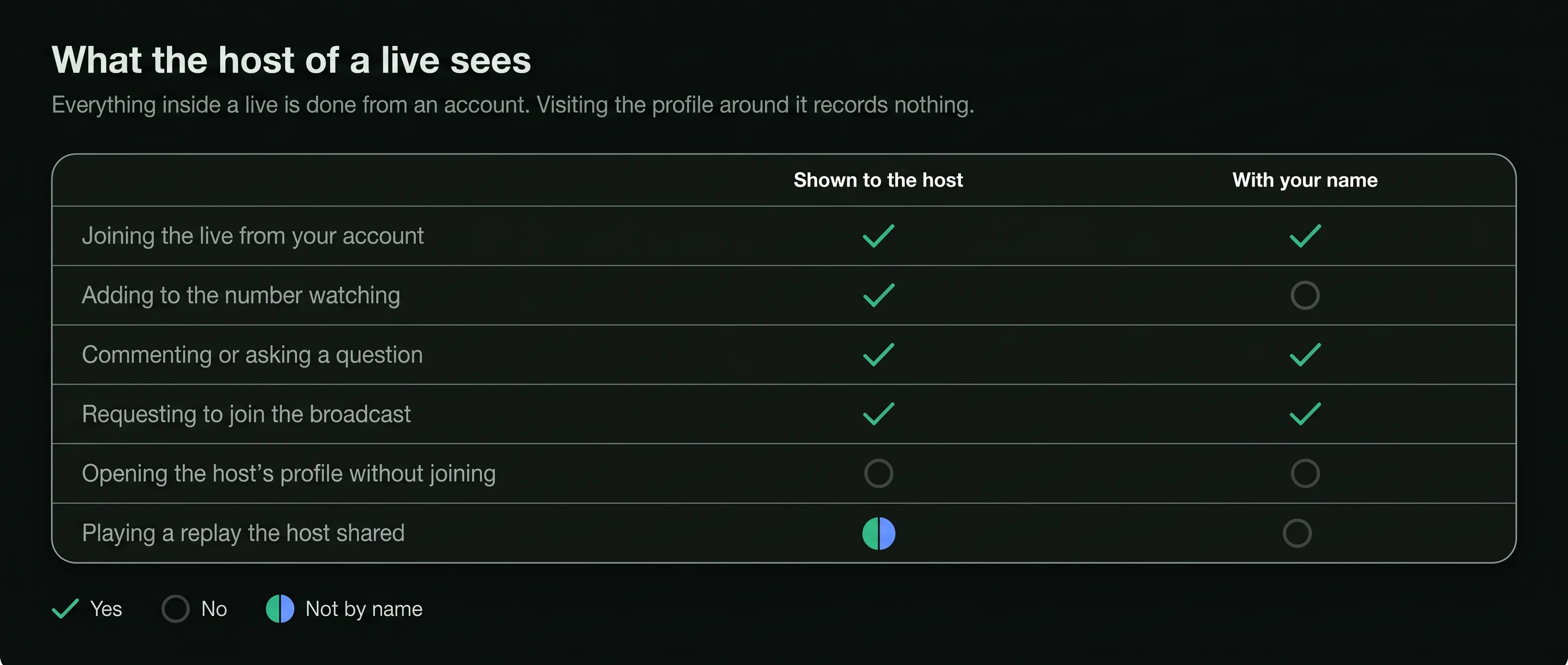
Not while it runsA live is watched by joining it from an account, and the host sees each account as it joins, with the number watching and every comment. What can be watched with no account is the replay, when the host shares it to a public profile.
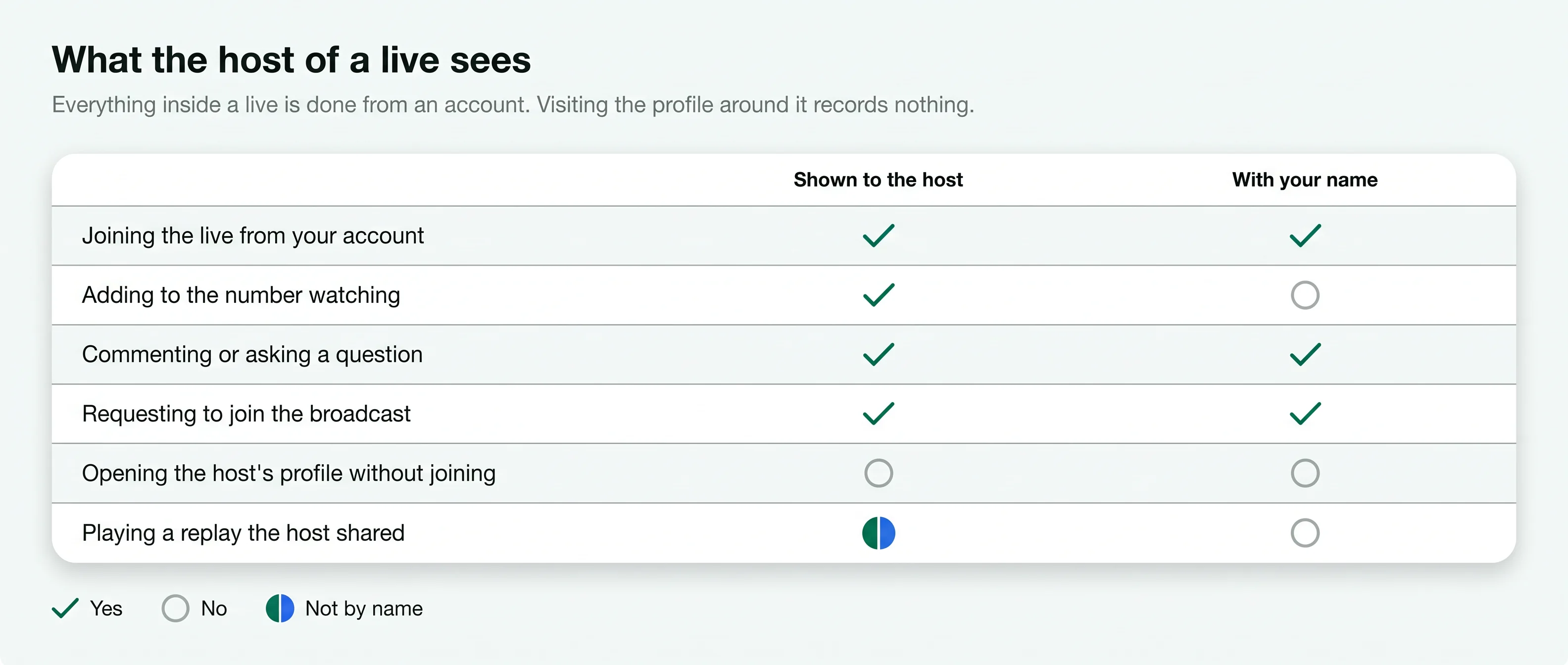
The host sees the accounts that join a live, in real time.
Comments, questions and requests to join each carry an account's name.
A replay exists for others only when the host shares it to the profile.
On a public profile, a shared replay plays in a viewer with no login.
A live is a video sent out in real time from one account. Six facts describe how it reaches its audience.
The host goes live from the app. The broadcast runs until the host ends it.
Comments and questions appear on screen as they are sent, with the writer's username, for the host and everyone watching.
While it runs, followers see the host's picture at the front of their stories row with a Live label.
Instagram can send followers a notification when an account they follow goes live.
Each person watching has joined from an account, and the host sees it arrive.
The host can invite a viewer to broadcast alongside them. A request to join is sent from an account, by name.
A viewer opens the public profile and what stays on it. The live itself is joined in the app, from an account.
Enter the handle of the account that runs lives. The viewer needs nothing else from you.
Hosts often announce a coming live in a story or a post, with the day and the time.
Join from your account in the app and the host sees you. Or wait: if the host shares the replay, it plays from the profile.
A live is the most visible way to watch anything on Instagram. The host's screen shows the audience as it arrives.
The host sees an account when it joins. Leaving after a few seconds does not take back what the host has already seen.
Opening the host's profile, reading its posts or playing a shared replay is not recorded for the host, signed in or not.
Each stage has different rules about who can see what.
Many hosts post a story or a post with the day and the time. On a public account, a viewer shows those announcements with no login. Those announcement posts open in an Instagram post viewer like any other public post.
Viewers join from their accounts and the host sees them arrive, with the number watching and every comment.
When the live ends, the host can share the replay to the profile or leave it unshared. Instagram also keeps a copy in the host's own archive, which only the host sees. A shared replay plays like other videos, covered on the Instagram video viewer page.
Sees each account as it joins
Recorded for a profile visit outside the live
A story announcing the live stays up
Everything you do inside a live is done from an account, so the host sees it. Everything you do on the profile around the live, before or after it, is the same as visiting any public profile: nothing is recorded for the host. Reels the host posted play the same way in an Instagram reels viewer, with nothing recorded either.
A viewer works on that second side. It opens the public profile, the announcements and any replay the host shared, with no account behind the look. Every viewer for public posts is listed under post, reel and video viewers.
A live does not stay on the profile by itself. Five facts about replays.
When the live ends, the host can share the replay to the profile. If they do not, nobody else can watch it again.
It sits on the profile like any other video, with its caption, likes and comments.
On a public account, a shared replay plays for any visitor, in the app or in a viewer, with no login.
On a private account, a shared replay is shown only to followers the owner approved.
Instagram keeps a copy of a live in the host's own archive. Nobody else can open it unless the host shares it.
A host has several settings over the audience of a live.
During a live, the host can remove an account from the audience. That account can no longer watch the broadcast.
In settings, an owner can hide their stories and lives from accounts they choose. Those accounts do not receive them.
The host can turn comments off for a live, so the audience watches without writing on screen.
On a private account, lives reach approved followers only, the same as its stories and posts.


No viewer needs your Instagram login. A page that asks for it is collecting accounts, whatever it promises about lives.
A site that offers to put you inside a live with no name shown to the host is promising something the broadcast is not built to allow.
When you want to comment or ask a question, join from your own account. The host sees you, and that is how a live is meant to work.
No. A story is posted and stays up to 24 hours. A live runs in real time and ends when the host stops.
Yes. The host can invite guests to broadcast alongside them, and every guest is shown by name.
The host may not have shared it, or may have removed it from the profile since.
Short answers to what people ask about watching an Instagram live.
Type a public username and open the viewer. No Instagram login on your side, no name on theirs.


