
Posts that name the account
Each photo, carousel or video where another account placed a tag naming this one, newest first.
Open the Tagged tab of a public Instagram account with no login: the photos and videos other accounts posted and tagged it in, who is allowed to tag it, how the owner hides tags, and what stays private.


Can you see someone's tagged photos on Instagram without logging in?
Yes, on public accountsA public account's Tagged tab is open to any visitor. An Instagram tagged photos viewer opens it in the browser from the username, with no login, and looking through it is not recorded for the owner or for the people who posted the photos.
The Tagged tab holds posts other accounts made and tagged this account in.
The owner decides who may tag them and can hide a tagged post or remove the tag.
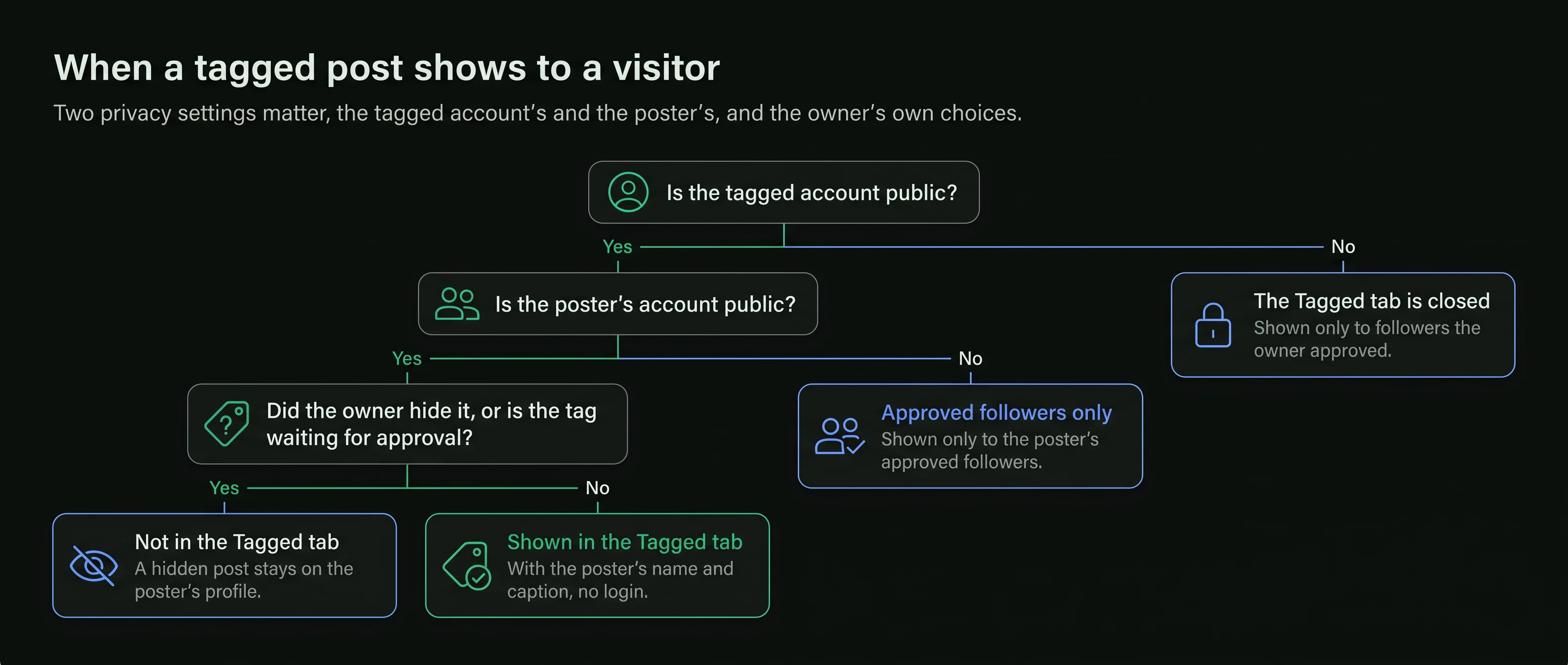
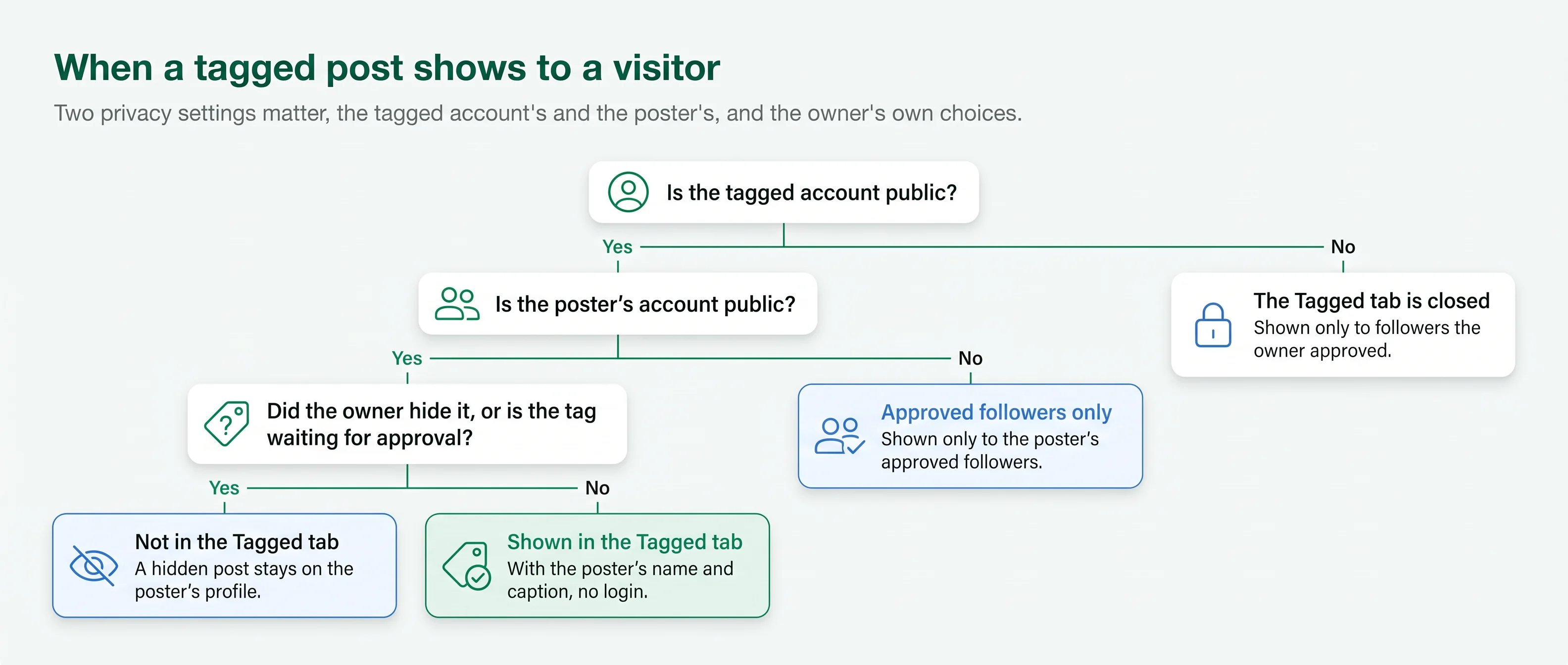
A tagged post from a private account is shown only to that account's approved followers.
On a private account, the whole Tagged tab is closed to visitors.
Every public profile has a grid of its own posts and, beside it, a Tagged tab. The second one is built by other people.
Each photo, carousel or video where another account placed a tag naming this one, newest first.
Every tagged post opens with the username and picture of the account that made it.
The poster's caption, with its hashtags and mentions, and the date the post went up.
A tag can sit on any slide of a carousel or on a video, and the whole post opens from the tab.
The likes and the comments under each tagged post, the same as on the poster's own profile.
Scrolling the Tagged tab and opening its posts sends no notice to the owner or to the posters.
The same on a phone, a tablet or a computer, with no Instagram login.
Enter the handle of the account whose tagged photos you want to see. The viewer needs that and nothing else.
The profile opens with its grid. Switch to the Tagged tab beside it to see the posts other accounts tagged it in.
Each post opens in full with the poster's name and caption. Tap the photo to show which accounts are tagged on it.
Instagram gives every account a set of choices over tags. Each one changes what appears in the tab that visitors see.
New tags wait for the owner before they reach the Tagged tab.
The default. Any account can tag this one in a photo or video, and the post appears in the Tagged tab unless the owner has asked to approve tags first. A tagged video plays with sound in the Instagram video viewer.
Only the accounts the owner follows can tag them. Tags from anyone else are not allowed.
The owner can turn tagging off. Nobody can tag the account in new posts, and the Tagged tab stops filling up.
With this setting on, a new tag waits for the owner's approval before the post appears on the profile. Until then, visitors do not see it in the Tagged tab.
A tag is placed by the person who made the post. The tagged account can accept it, hide the post or remove its name, but it cannot add tags to someone else's post.
A viewer shows the Tagged tab as Instagram shows it to any visitor when you open it. Posts the owner has not approved or has hidden are not part of it.
The Tagged tab is shaped by its owner as well as by the people who post. Two controls change what a visitor sees there, and both work on any account, public or private. Whether the people who tag an account also follow it shows on its follower list, which an Instagram follower viewer opens.
Hiding a post takes it out of the owner's Tagged tab but leaves the post, and the tag, on the poster's profile. Removing the tag takes the owner's name off the post itself, so the post no longer links to them anywhere.
Two privacy settings matter: the tagged account's, and the poster's. A tagged post is open to a visitor only when both allow it.
On a private account, the Tagged tab is shown only to followers the owner approved. A site that offers to open it is not telling the truth.
People often use the two words for the same thing. On Instagram they are different, and only one of them fills the Tagged tab.
The poster places it on the image or video. It puts the post in the tagged account's Tagged tab and shows when someone taps the photo.
An @username written in a caption, a comment or a story. It notifies the account named, but does not put the post in the Tagged tab.
A tag and a mention each send a notification to the account named, with the name of the account that made them.
To see where an account was mentioned rather than tagged, read the captions and comments on the public posts involved.
A tag has no expiry. It stays on the post until the poster, the tagged account or a setting changes it.
The account named gets a notification. If the owner approves tags by hand, the post waits for approval before it appears in their Tagged tab.
On a public account, any visitor can open it from the tab. The owner can hide it from the profile or remove the tag at any time.
A deleted post, a removed tag or a hidden post leaves the Tagged tab. A viewer shows the tab as it stands when you open it.
Holds every post the account is tagged in
Of the people who look through it
The tagged account's and the poster's


A tagged photos viewer works from a public username. A page that asks for your Instagram login is after your account.
No site can open the Tagged tab of a private account. A page that offers it wants a survey, an install or a payment.
Looking is open to anyone on a public account. Posting someone else's photo again as your own needs their permission.
Yes. A reel can carry tags like any post, and it appears in the tagged account's tab.
You may have hidden the post from your profile, or your settings may ask you to approve tags first.
Yes. The account that placed a tag is named on the post and in the notification the business receives.
Short answers to what people ask before they use an Instagram tagged photos viewer.
Type a public username and open the viewer. No Instagram login on your side, no name on theirs.


