Viewers / Profiles

Instagram profile picture viewer

See an Instagram profile picture at the size it was uploaded instead of the small circle the app shows: how an Instagram DP viewer works, what it shows on public and private accounts, and when a full-size picture helps.

  • No login
  • Square, not a circle
  • Any device
Profile picture · Example
N
nora.weissProfile picture
Full size
Example profile picture at full size: portrait of a woman with short curly hair in a green sweater
  • In the appA small circle
  • In the viewerThe square, as uploaded
  • The cornersShown in full
Your look · not recorded

Can you see an Instagram profile picture in full size?

Yes, on public accounts

The app shows a profile picture as a small circle. An Instagram profile picture viewer opens the same picture at the size the owner uploaded it, with no login. A private account's picture stays public at the small size Instagram gives every visitor.

Key points
  1. 1

    The profile picture is public on every account, public or private.

  2. 2

    A DP viewer opens a public account's picture at its uploaded size, as a square.

  3. 3

    Opening a profile picture is not recorded for the owner.

  4. 4

    On a private account the picture, name, bio and counts stay public; the rest is closed.
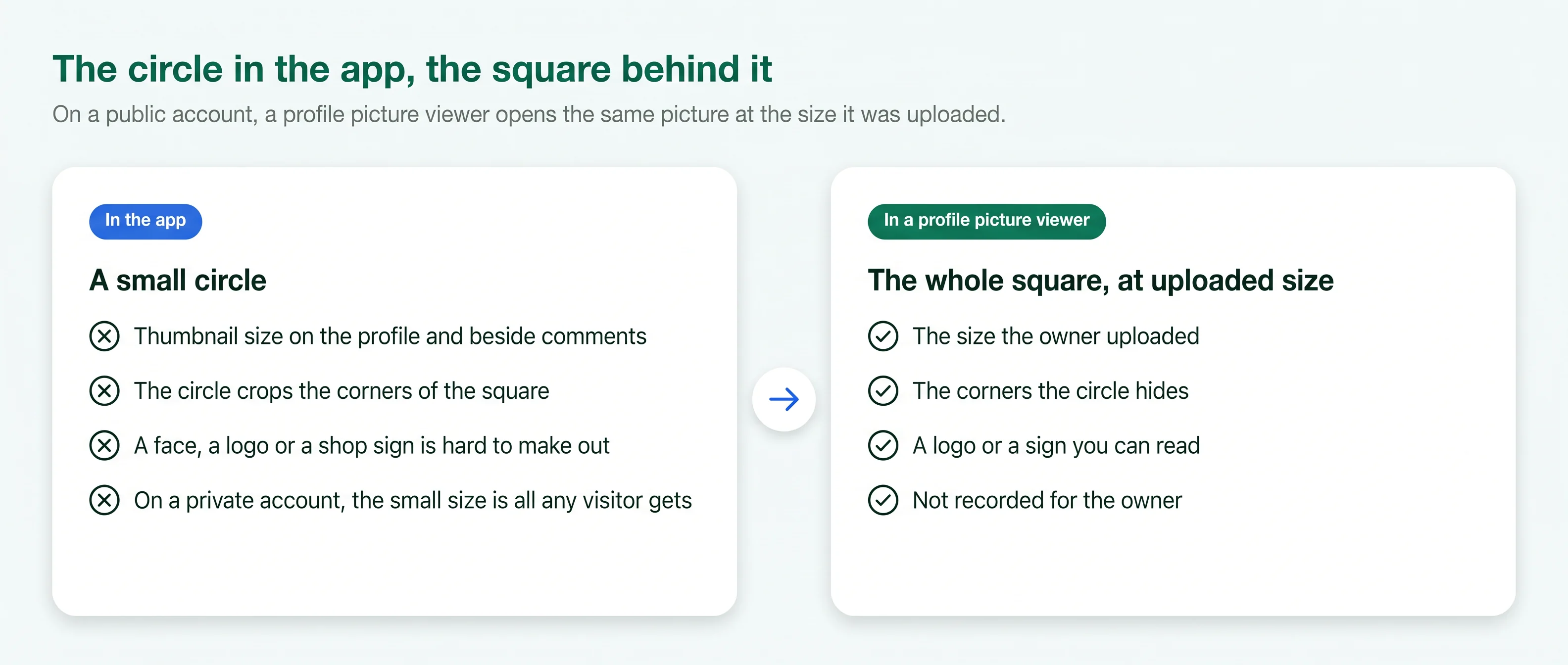
Before and after: a profile picture as a small circle in the app, and as the full uploaded square in a viewer
What a profile picture viewer adds to the small circle the app shows on a public account. Free to share with a link to this page.
What you see

The picture behind the circle.

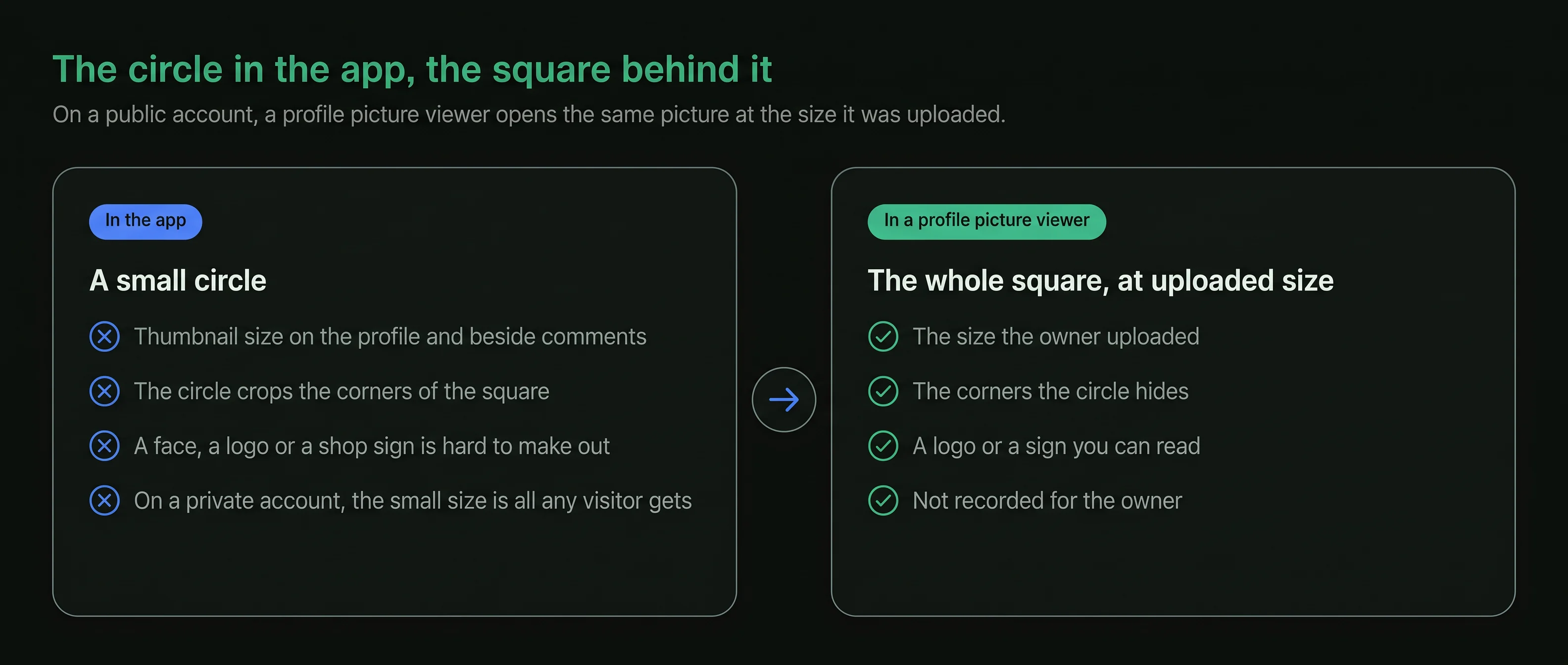
Instagram shows a profile picture at thumbnail size: on the profile, beside every comment and in search results. A face, a logo or a shop sign at that size is hard to make out. Every other part of a public profile, from the bio to the grid, opens in an Instagram profile viewer.

An Instagram DP viewer opens the same picture at the size it was uploaded, in your browser and with no Instagram account. Nothing about the picture changes; you see more of it.

A profile picture viewer shows

  • The picture at the size it was uploaded
  • The whole square, with the corners the circle hides
  • The name and username beside it
  • The bio and counts from the same header
  • The picture as it is today
How it works

Open a profile picture in three steps.

The same on a phone, a tablet or a computer, with no Instagram login.

  1. 1

    Type the username

    Enter the handle of the account whose picture you want to see. The viewer needs nothing else from you.

  2. 2

    Open the profile

    The profile header loads in the browser: the picture, the name, the bio and the counts.

  3. 3

    Open the picture

    Tap the picture to open it at full size. Zoom in to read a logo or a sign.

Circle and square

Why the circle is small, and what the full size adds.

Four facts about how Instagram stores and shows a profile picture.

Example profile picture: portrait of a man with a trimmed beard in a green top
  • Inside the dashed circleWhat the app shows, at thumbnail size
  • The four cornersWhat the full-size square adds
  1. The circle is a thumbnail

    The app shows the picture at thumbnail size on the profile, beside comments and in search results. At that size, detail is lost.

  2. The picture is a square

    The owner uploads a square picture. The circle is the app's crop, so the corners the app hides appear in the full-size view. The picture opens without an account, like the rest of a public profile, as the page on how to view Instagram without an account explains.

  3. A viewer opens the uploaded size

    On a public account, a profile picture viewer opens the same picture at the size the owner uploaded it, so a face, a logo or a shop sign can be read.

  4. One picture everywhere

    The same picture appears on the profile, on comments, in messages and in search. Whatever the full-size view shows is what the owner chose to show everyone. The other ways to look at a public profile are grouped under profile viewers.

Public or private

What a profile picture viewer shows on each kind of account.

A private setting closes an account's content, not its header. The picture stays public either way.

Public accountPrivate account
Profile picture shown Yes Yes
Size of the pictureFull sizeSmall size
Name, bio and link Yes Yes
Post, follower and following counts Yes Yes
Posts, stories and highlights Yes No
Follower and following lists Yes No
The rest of a private account stays closed.

A private account's posts, stories, highlights and lists are shown only to followers the owner approved. A site that offers more than the public header is not telling the truth.

When it helps

Why people open a profile picture at full size.

Most reasons come down to one question: is this the account I think it is?

Confirm the right account

Several accounts can share a display name. A full-size picture shows the face or logo clearly enough to tell them apart.

Read a logo or a sign

Shops and studios often use a logo as their picture. At full size the name on it can be read.

Before you pay

Check that a seller's or a host's account matches the business you found elsewhere before money changes hands.

A framed portrait beside a camera lens on a shelf

Spot a copied picture

An account using another person's or a business's photo is easier to spot when you compare the two pictures at full size.

Before a follow request

Make sure the private account is the person you know before you send a request with your name on it.

No record of the look

Instagram does not show the owner that you opened the picture, whether you are signed in or not.

When the picture changes

A viewer shows the picture as it is today.

The owner can change the picture at any time. This is what happens when they do.

  1. 1
    The upload

    The owner chooses a new picture

    The new picture replaces the old one on the profile, on every comment and in search, at the same moment.

  2. 2
    From then on

    Every visitor sees the new picture

    A profile picture viewer opens the new picture at its uploaded size on a public account, and at the small size on a private one. When a picture changed and the name looks unfamiliar, an Instagram username search confirms the account from its handle.

  3. 3
    The old picture

    No history is shown

    Instagram shows no list of past profile pictures. Once a picture is replaced, a viewer has only the current one to show.

Who uses it

Four ordinary reasons to open a profile picture.

Emma CarterA birthday cake
Example
The situation
Emma was ordering a cake from a home baker she found through a friend. Two accounts had almost the same name.
What they did
She opened both profile pictures at full size, saw the baker's logo on one, and ordered from that account.
Daniel MoreauA copied logo
Example
The situation
A customer told Daniel that an account was using his café's logo and offering vouchers.
What they did
He compared the two profile pictures at full size, saw his own logo, and reported the account to Instagram as impersonation.
Claire DuboisTwo photographers
Example
The situation
Claire was choosing a photographer for a shop launch, and two studios had similar names.
What they did
Their pictures at full size showed two different logos, so she knew which studio's portfolio she had been reading.
Lena HoffA school friend
Example
The situation
Lena remembered an old school friend's face but not her username. Three private accounts had her name.
What they did
She opened each public header, recognised the face in one picture, and sent a follow request to that account.
Is it right for you

Good for, not for.

A profile picture viewer is good for

  • Seeing a public account's picture at its uploaded size
  • Telling apart accounts that share a name
  • Reading a logo or a sign in a picture
  • Checking a private account's public header before a follow request

It is not for

  • Seeing a private account's picture at full size
  • Seeing past profile pictures
  • Posting someone's picture as your own or on another account
  • Opening the posts behind a private account
Stay safe

Three rules for any profile picture viewer.

  1. Never type your Instagram password

    A profile picture viewer needs a public username and nothing else. A page that asks for your login is after your account.

  2. If someone uses your picture

    Report the account from its profile as impersonation, and keep a screenshot of it before you do.

  3. A picture belongs to its owner

    Look at it, compare it, keep a copy for your own reference. Using it as your own picture is impersonation.

Last reviewed 4 October 2026Facts checked against Instagram's own help pages

What changed
  • New page: the profile picture at full size, square instead of round
  • What a private account's picture shows: public, at the small size Instagram gives every visitor
Questions

About profile pictures.

Short answers to what people ask before they use an Instagram profile picture viewer.

01Can I see an Instagram profile picture in full size?
Yes, on a public account. The app shows the picture as a small circle; an Instagram profile picture viewer opens the same picture at the size it was uploaded, with no login.
02What is an Instagram DP viewer?
The same thing under another name. DP stands for display picture, the photo or logo in the circle at the top of a profile.
03Will the person know I looked at their profile picture?
No. Instagram does not record who visits a profile or opens its picture, whether the visitor is signed in or not.
04Can I see a private account's profile picture?
Yes. The picture is part of a private account's public header, with the name, the bio and the counts, at the small size Instagram gives every visitor. The posts behind the lock stay closed.
05Why does the full-size picture look different from the circle?
The picture is stored as a square. The circle is the app's crop, so the full-size view shows the corners the app hides.
06Can I see someone's old profile picture?
No. When the owner uploads a new picture it replaces the old one everywhere, and Instagram shows no history of past pictures.
07Can I save a profile picture?
Your browser can save any image it shows. The picture belongs to its owner: keep a copy for your own reference only, and never post it as yours or on another account.
08Why does a username show a grey outline instead of a picture?
The owner has not uploaded a profile picture. A viewer then shows the same blank outline the app shows.
09Does it work on a phone?
Yes. The viewer runs in the browser on an iPhone, an Android phone or a computer, with nothing to install.
10Is this site part of Instagram?
No. ProfileScanner is an independent guide and is not affiliated with Instagram or Meta.
11Does PeekViewer show profile pictures in full size?
Its pages list posts, reels, stories, comments and tagged photos, and a downloader for stories, photos and videos in their original quality. A profile picture is not named on its own. Our PeekViewer review covers what the service lists and what it costs.
12What is a PFP on Instagram?
PFP is short for profile picture: the round photo at the top of an account. DP, display picture, means the same thing.
Ready when you are

Look first. Stay unseen.

Type a public username and open the viewer. No Instagram login on your side, no name on theirs.

A woman relaxing on a sofa, looking at her phone
Open the viewer