
Automated
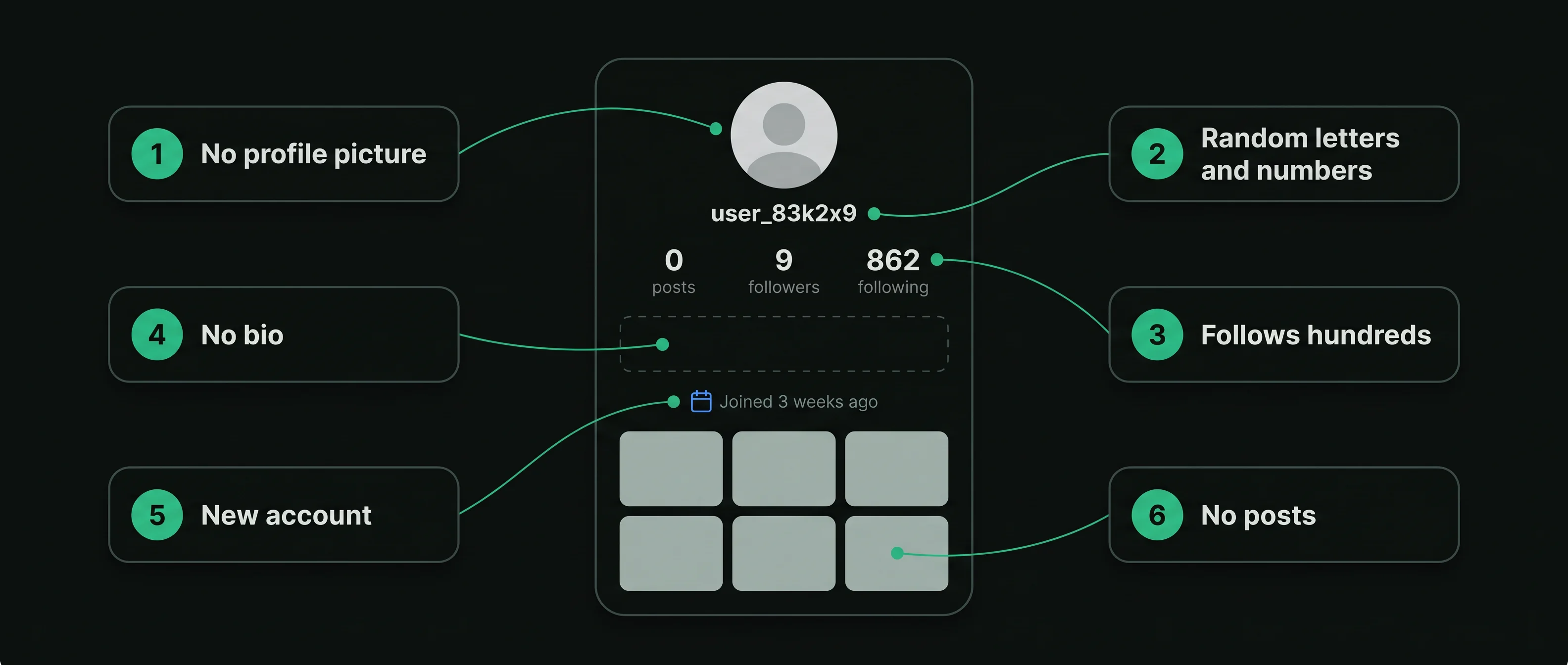
No picture, a letters-and-numbers handle, no posts and thousands of followings. Often followed you in the same week as others like it.
Automated and abandoned accounts end up on most follower lists. This guide shows what they look like, why they follow you, how to tell them from quiet people, and how to remove them inside the app.

How do you find bot followers on Instagram?
Read each follower's public profile for the same few signsBot accounts share a shape: no profile picture, a handle of letters and numbers, no posts, and far more followings than followers. Check your followers against those signs, open the likely ones, and remove them from your follower list in the app.
No single sign proves a bot. Several together are a strong hint.
Bots follow in bulk to be followed back, to promote links, or to pad bought follower packages.
Quiet people who never post are not bots. A picture, a name and mutual friends usually mean a person.
Removal happens in the app, one account at a time. No tool needs your password.
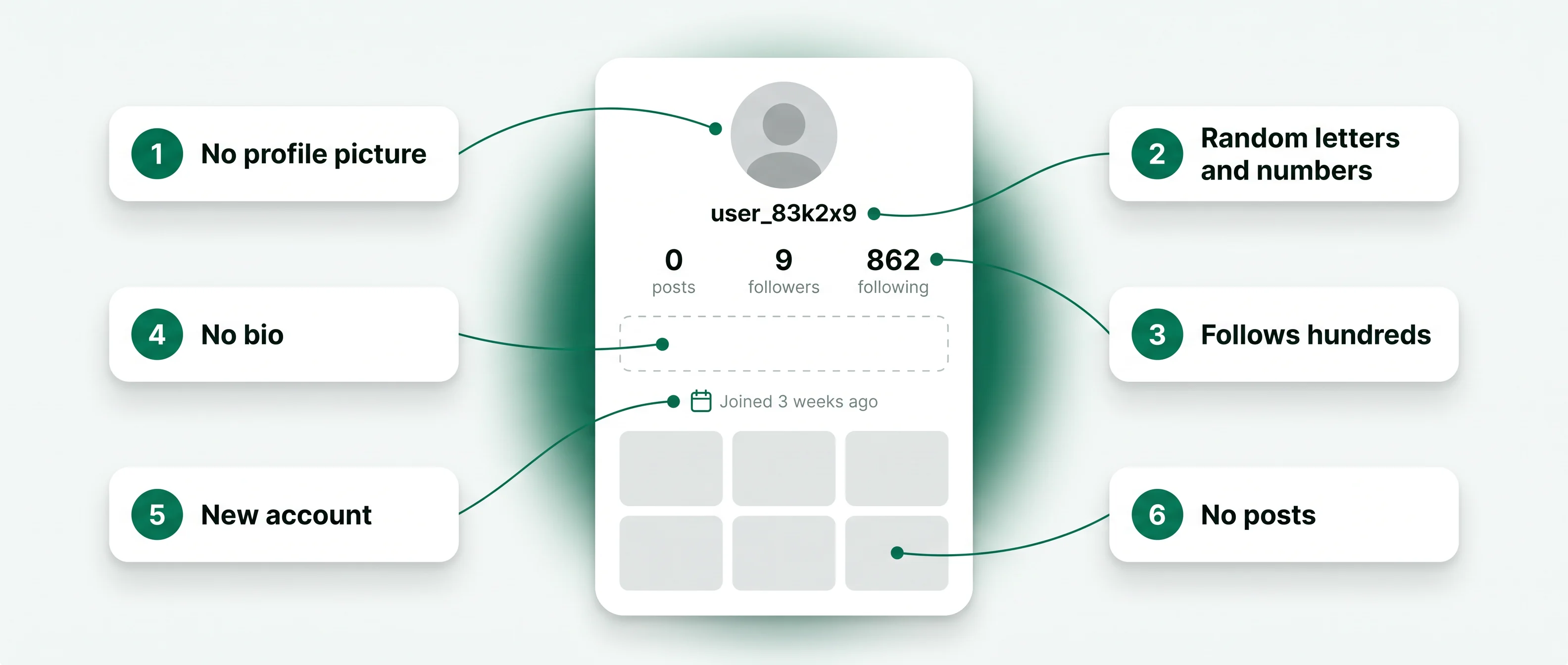
Every sign below can be read from the profile itself. One sign is common on real accounts; three or four together are the shape of an automated one.
Being followed by a bot says little about you. It says what the bot was set up to do.
Some accounts follow thousands of others in the hope that a share follow back, then unfollow later. Your follow is the goal.
Spam accounts follow you so their bio link or their messages reach you.
Services that sell followers often deliver automated accounts. Some follow random accounts too, so the delivered followers look active. An Instagram fake follower check estimates how much of a count is bought in this way.
Giveaways that ask entrants to follow several accounts attract throwaway accounts that stay on the list after the draw.
An account its owner stopped using looks much the same as a bot: no new posts, an old picture or none. It is inactive rather than automated. When such accounts leave your list in a clean-up, a who unfollowed me check shows the names that went.
A follower with no posts can be any of these. The difference decides whether removing it is worth a tap.
No picture, a letters-and-numbers handle, no posts and thousands of followings. Often followed you in the same week as others like it.
A picture, a name, a short bio, no posts and some mutual friends. A real reader who does not share.
An account with a picture and old posts that stopped years ago. A person once, no longer reading.
A few seconds on the profile settles most cases. If it follows people you know, it is most likely a person, whatever its post count.
Your username is the only thing you type. The removing stays with you, in the app.
Type your own public Instagram username. No password and no login are needed.
Every follower's public profile is set against the six signs: picture, handle, posts, counts, bio and mutual followers.
Open your follower list in Instagram and tap Remove beside the accounts you decided are not people.
Each one is an option in Instagram itself. Start with the lightest that does the job.
In your follower list, tap Remove beside the name. The account is not notified.
If it comments, restrict it: its new comments are shown only to itself until you approve them.
If it comes back or sends spam, block it from its profile. It can no longer find your account.
Report the account as spam from its profile. Instagram reviews reported accounts.
Instagram limits activity that looks automated. Removing a long list of followers in a few minutes can trigger a temporary limit, so spread a large clean-up over several sessions.
No setting stops every automated account. A few choices make your account less useful to them, and let you approve followers before they appear. Like the other follower tools on this site, this one reads and reports, and the removing stays with you.
The trade-off is reach: a private account shows its posts only to the followers you approve, so new readers see your header and a lock.
Removing them is a choice. These are the facts to weigh it against.
Instagram's rules prohibit collecting followers, likes or comments by artificial means, including buying them. Bought followers are often the automated accounts this page describes, and Instagram removes accounts it finds to be fake.


Finding bot followers needs public profiles and your username. A tool that asks for your login is after your account.
An app that removes followers for you signs in as you, and Instagram limits activity that looks automated.
A check reads and marks. Removing, blocking and reporting stay in the app, done by you.
Instagram removes fake and automated accounts. When it does, they leave your follower list on the same day.
Only if you approved their follow request. On a private account, ignore requests from accounts with the signs above.
On a public account, yes. The fake follower check covers testing someone else's count.
Short answers to what people ask when their follower list fills with accounts that are not people.
Type a public username and open the viewer. No Instagram login on your side, no name on theirs.


