
The main grid
Videos posted to the profile, mixed with photos, each one marked as a video in the corner.
Watch videos from public Instagram accounts in the browser, longer ones and short reels alike, with no app and no login: where videos sit on a profile, how to get the sound on, what decides the picture quality, and what the owner can see.


Can you watch Instagram videos without logging in?
Yes, from public accountsVideos on a public account are open to any visitor. An Instagram video viewer plays them in the browser from the username, with sound and at the quality Instagram serves. The owner sees a view count with no names, so watching is not recorded against you.
Videos sit in the grid, in the reels tab, inside carousels and in stories and highlights.
Browsers often start muted; one tap turns the sound on.
Quality depends on the upload and your connection, not on the viewer.
A private account's videos are closed to everyone the owner has not approved.
Instagram now shares most new video posts as reels, but videos still turn up in several places. A video viewer opens all of them on a public account.
Videos posted to the profile, mixed with photos, each one marked as a video in the corner.
Every reel the account has posted, newest first, in the tab beside the grid.
Video stories play for 24 hours after they are posted, then leave the profile.
Video stories the owner saved under the bio, for as long as the owner keeps them there.
Playing any of them adds to a count at most. It never adds your name to anything the owner reads.
The same on a phone, a tablet or a computer, with no Instagram login.
Enter the handle of the account whose videos you want to watch. The viewer needs nothing else.
The profile opens with its grid and its reels. Videos carry a small marker in the corner of their tile.
The video plays in your browser. Tap once for sound, pause, scrub back, and read the caption and comments under it.
Sound is the most common question about videos in a browser. Four facts cover it.
Most browsers do not let a page start a video with sound until you interact with it. Tap or click the video once to turn the sound on.
On some phones, the silent switch or a low media volume keeps a browser video quiet. Check the media volume, not the ringer.
Under a reel, a line names the track it uses, or says original audio when the creator recorded the sound themselves.
It cannot add, change or remove the sound on a video. Some creators post a video with music only, or with no sound at all.
A browser plays the sound through whatever the device uses for media, so headphones work the same way they do for any website.
Many creators write their words on the video itself. Those play with the picture, sound on or off.
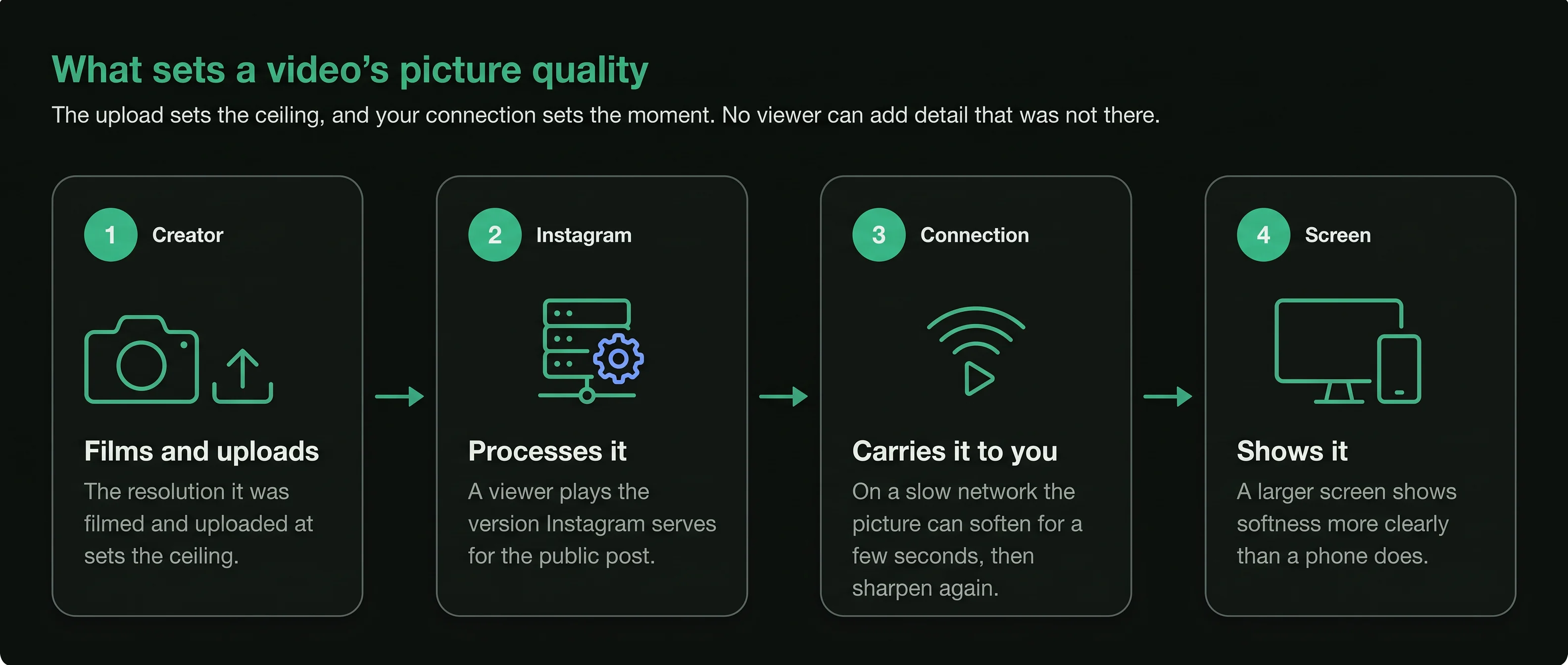
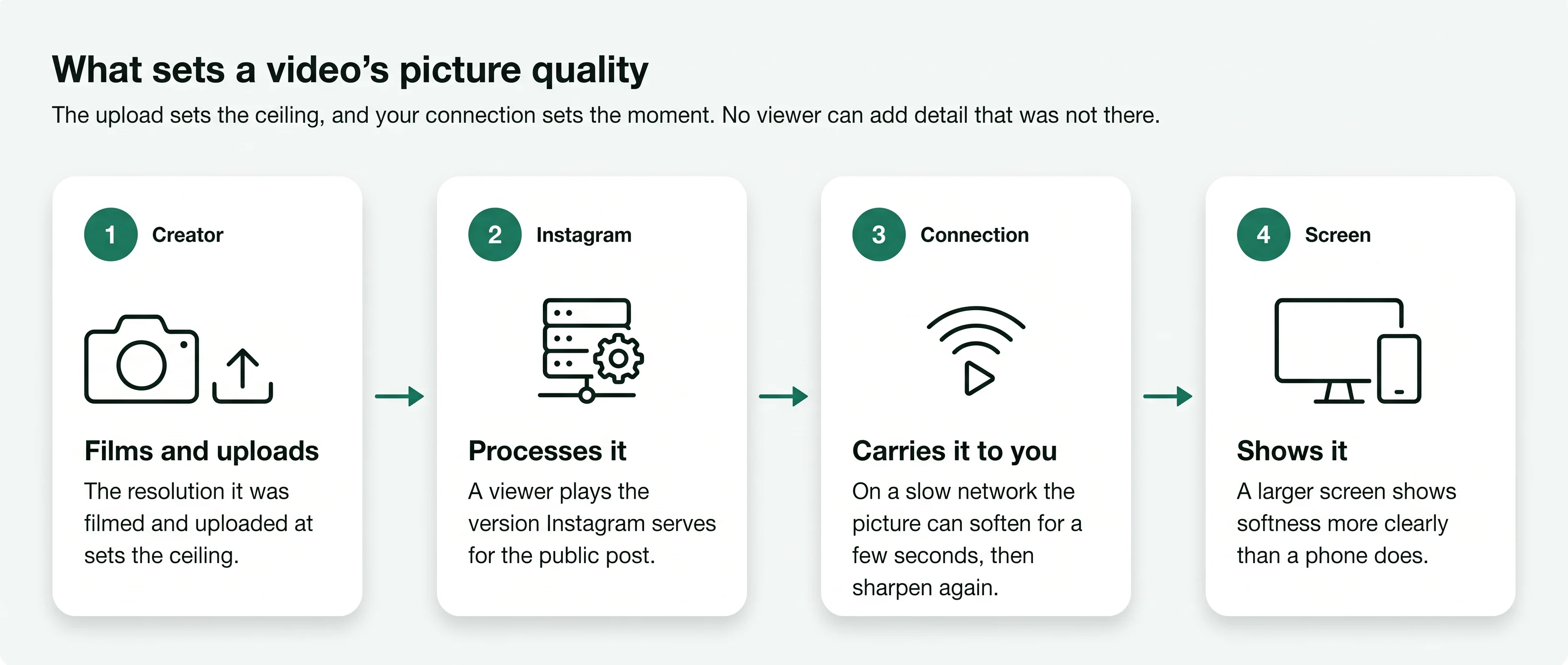
A viewer plays the video Instagram serves for a public post. The sharpest it can ever look is the version the creator uploaded, after Instagram has processed it. Nothing in a browser or a viewer can add detail that was not there.
Within that ceiling, your connection decides what you see. On a slow network the picture can soften for a few seconds while the video catches up, then sharpen again. A larger screen shows any softness more clearly than a phone does.
The resolution it was filmed and uploaded at.
How it is processed for Instagram.
How fast it reaches you.
How big it is shown.
Each action around a video either adds to a number or adds a name. Only the second kind reaches the owner as you.
A business or creator account has insights for each video, with counts such as views and reach. Insights count people; they do not list who watched. During a live broadcast the host does see names, one for each account that joins; the Instagram live viewer page explains why.
The clock and the audience differ from one kind to the next. Here is what a visitor to a public account can expect.
Videos, reels and stories on a private account are shown only to followers the owner approved. A site that offers to play them is not telling the truth.
A video post has no 24-hour clock. It stays on the profile until the owner changes it.
The video appears in the grid or the reels tab, or both. On a public account, anyone can play it from then on.
Views, likes and comments grow as people find it. The owner can hide the like count, turn comments off or pin the video to the top.
An owner can archive or delete a video. A viewer shows the profile as it is when you open it, so a removed video no longer appears. Videos in which other accounts tagged the owner sit in a separate tab, opened by the Instagram tagged photos viewer.
Behind a video's view count
A video story stays live
The owner can read a story's viewer list


A video viewer works from a public username. A page that asks for your Instagram login is after your account.
Every current browser plays these videos. A page that says you need to install a player first wants something else.
Watching is open to anyone on a public account. Posting someone's video again as your own needs their permission.
Both play the same way for a visitor. Instagram now shares most new video posts as reels, so most videos sit in both the grid and the reels tab.
Yes. The browser's full-screen control works on a viewer the same way it does on any video page.
The owner may have archived or deleted it, or the account may have gone private since.
Short answers to what people ask before they use an Instagram video viewer.
Type a public username and open the viewer. No Instagram login on your side, no name on theirs.


