Viewers / Highlights

Instagram highlights viewer

Open a public account's saved highlights without an Instagram account, at your own pace, with no seen mark left on their side.

  • No login
  • At your own pace
  • Public accounts only
Highlights viewer · Example
MenuPricesTripsHours
Example highlight: a dinner table set on a terrace at dusk
MenuStory 3 of 4 · paused
  • Saved14 months ago
  • Time limitNone
  • LoginNot needed
Your name · not on any list

Can you view Instagram highlights anonymously?

Yes, for public accounts

Highlights are stories the owner has kept on the profile. An Instagram highlights viewer opens them in the browser without your account, so your name is not recorded, and the owner is not told. Private accounts stay closed.

Key points
  1. 1

    A highlight is a story the owner saved under the bio; it stays until they remove it.

  2. 2

    The owner can see a viewer list only while the saved story is under 48 hours old.

  3. 3

    A highlights viewer plays them in order, at your own pace, with no Instagram login.

  4. 4

    Highlights on a private account stay closed to everyone the owner has not approved.

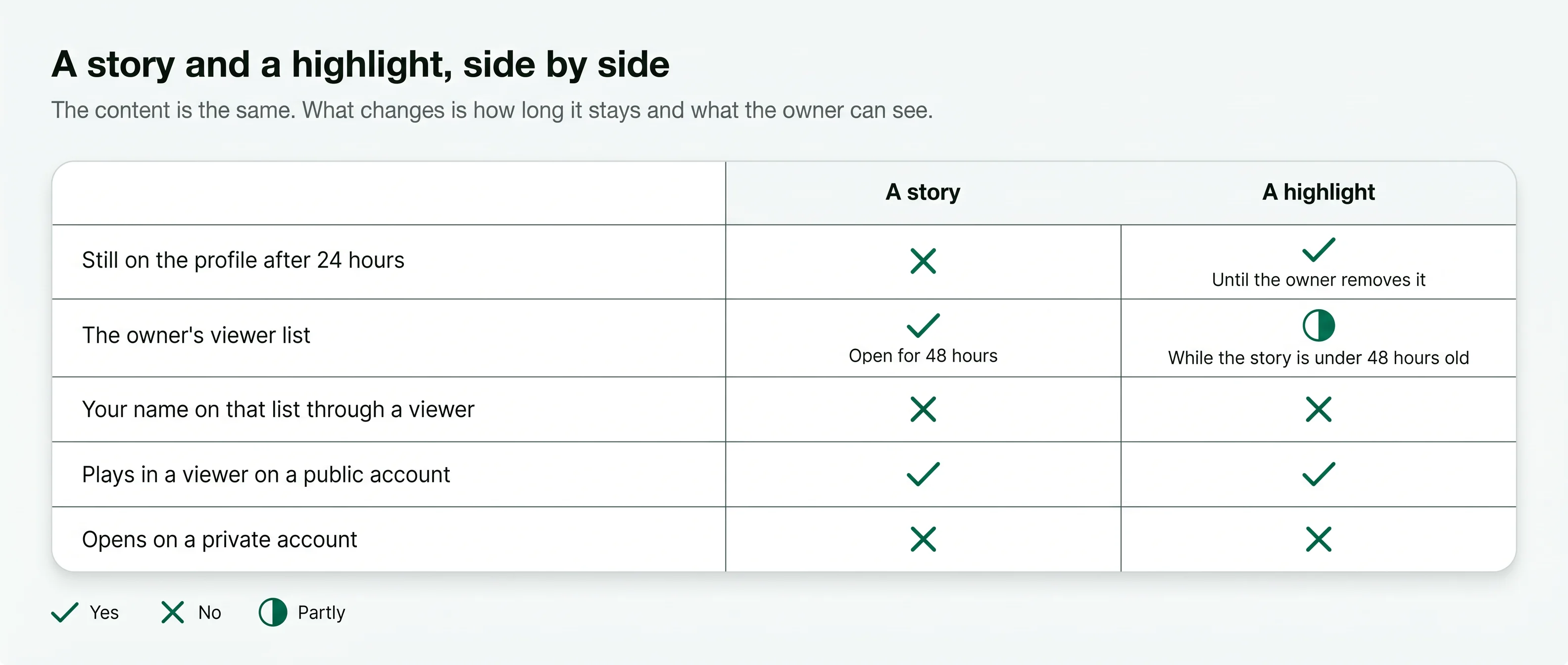
Story versus highlight: a highlight stays until removed, its viewer list only in the first 48 hours; no name via a viewer
How an Instagram story and a highlight differ in how long they stay and what the owner can see. Free to share with a link to this page.
What a highlight is

Stories the owner decided to keep.

A story lasts 24 hours. When an account owner wants one to stay, they save it to a highlight: a named circle under the bio that holds the story for as long as they like. Trips, menus, prices, reviews and announcements usually live there. Stories still inside their 24 hours play in the Instagram story viewer.

An IG highlights viewer opens those circles without an Instagram login. You pick a highlight, it plays, and you move on. If a highlights viewer stops loading, six checks for another one are on the Iganony alternative page.

What you can watch

  • Every highlight on a public profile, by name
  • Each story inside, in the order it was saved
  • Photos, videos, text and music as posted
  • Highlights from months or years ago, if the owner kept them
  • All of it without an Instagram login
How it works

Three steps, no Instagram login at any point.

  1. 1

    Type the username

    Enter the public Instagram username whose highlights you want to see. You do not need an account of your own.

  2. 2

    Pick a highlight

    The viewer opens in a new tab. The named circles under the bio are the highlights; tap the one you want.

  3. 3

    Watch at your own pace

    The stories inside play in order. Pause, go back, or jump to the next highlight. Nothing of yours touches the account.

Stories or highlights

Two kinds of story, one difference.

The content is the same. What changes is how long it lasts and what the owner can see about it.

A storyA highlight
How long it stays24 hoursUntil the owner removes it
Where it showsThe ring around the profile pictureThe named circles under the bio
The owner's viewer listShown for 48 hoursOnly while the story is under 48 hours old
Your name on that list through a viewerNoNo
Needs your Instagram loginIn the app, yesIn the app, yes
What the owner sees

Can they see who viewed their highlights?

Instagram keeps a viewer list for a story for 48 hours. A highlight is a saved story, so the owner can open that same list while the story is under 48 hours old. After that, the list is gone. Either way, a viewer loads the highlight without your account, so your name is not on it.

In the app, signed inThrough a viewer
Your name on the viewer list (first 48 hours)ShownNot shown
Your name after 48 hoursNo list existsNo list exists
A notification sent to the ownerNoneNone
A like or reply tapped by mistakePossibleNot possible
Works for private accountsIf they approved you No
Who uses it

What people open highlights for.

Highlights are where accounts keep the useful parts.

Claire DuboisMenus, prices and hours
Example
The situation
Claire wanted a haircut on a Sunday. Restaurants, salons and studios often keep their menu, price list and opening hours in a highlight rather than a post.
What they did
She opened the salon's Prices and Hours highlights in a viewer, read them at her own pace, and called to book.
Daniel MoreauReviews and results
Example
The situation
Daniel was choosing a personal trainer. Shops and trainers save customer messages, before-and-after results and reviews as highlights.
What they did
He went through two trainers' Results highlights in the browser before writing to either of them.
Emma CarterA creator's best work
Example
The situation
Emma follows travel writing. A creator's highlights are the trips, projects and series they want new visitors to see first.
What they did
She watched a creator's Lisbon highlight from last year to plan a weekend, without an Instagram login.
Lena HoffAnnouncements
Example
The situation
Lena's usual café had shut its doors one Monday. Changes of address, holiday closures and launches are often saved as a highlight so they stay visible.
What they did
She checked the café's Announcements highlight on her phone and found the holiday dates.
Compared

Three ways to watch highlights without being seen.

Each has a catch. This is where they differ.

A viewerA second accountInstagram's website, logged out
Plays highlights Yes Yes No
Works without an Instagram login Yes No Yes
Keeps your name off the viewer list YesThe second account is listedNothing plays
Shows old highlights Yes Yes No
An empty yoga studio with a rolled mat on the floor

A highlights viewer

Loads the public profile and its highlights on a web page with no account behind it.

A second account

Highlights play, but the second account's name is recorded in the first 48 hours, and it needs a login.

Instagram's own website

Logged out, the profile opens for a short look, but highlights and stories do not play.

At your own pace

Watch a highlight the way you want.

In the app a story runs on its own clock. In a viewer you set the pace.

Pause and go back

Read a price list or a long caption slowly, go back a frame, and take as long as you need on any story in the set.

Jump between highlights

Open one highlight, then the next, without going back to the profile each time. The order is the owner's order.

Old highlights too

A highlight saved a year ago opens the same way as one saved today, as long as the owner has kept it on the profile. Every viewer for stories and highlights is listed under story and highlight viewers.

Phone or computer

It runs in the browser on an iPhone, an Android phone or a computer, with nothing installed and no login.

Is it right for you

Good for, not for.

A highlights viewer is good for

  • Watching saved stories on a public profile without your name recorded
  • Reading a menu, price list or announcement an account keeps in a highlight
  • Catching up on a creator's older stories without an Instagram account

A highlights viewer is not for

  • Private accounts
  • Close Friends stories, which are never saved to a public highlight
  • Replying to or reacting to a story
A private account's highlights stay closed.

Highlights belong to the profile. On a private account they are shown only to followers the owner has approved. No website can open them, and pages that promise it are not telling the truth. The anonymous Instagram story viewer page explains, step by step, why no name is added when a highlight plays.

Stay safe

Three rules for any highlights viewer.

  1. DoGive a viewer a public username and nothing elseDon'tNever type your Instagram password: a page that asks you to log in to Instagram is not a viewer
  2. DoUse it in the browser on an iPhone, an Android phone or a computer: no install neededDon'tBe wary of viewer apps that ask for wide permissions
  3. DoWalk away from private-account promisesDon'tTrust a site that says it can open private highlights: it is after your details or your money

Last reviewed 4 October 2026Facts checked against Instagram's help pages

What changed
  • Short answer, comparison tables and safety rules redrawn for quicker reading
  • Highlight viewer lists: open only while the saved story is under 48 hours old
Questions

About watching highlights unseen.

Short answers to what people ask before they use an Instagram highlights viewer.

01Can the owner see who viewed their highlights?
Only in a narrow case. Instagram shows the viewer list of a story for 48 hours after it was posted, and that applies to the highlight it was saved into. After that, the list is gone and no one can see who watched a highlight. A viewer keeps your name off the list in both cases.
02Do I need an Instagram account?
No. An Instagram highlights viewer loads a public account's highlights in the browser. You type the username; nothing asks for a login.
03What is the difference between a story and a highlight?
A story disappears after 24 hours. A highlight is a story the owner chose to keep on their profile, grouped under a title, until they remove it.
04Can I watch highlights from a private account?
No. Highlights belong to the profile, and a private profile shows them only to approved followers. No website can change that.
05Can I see highlights without them knowing?
Yes, for public accounts. The viewer loads the highlight without your account, so there is no name to record and nothing is sent to the owner.
06Are highlights shown in order?
Yes. Each highlight plays its stories in the order they were saved, the same order the owner sees.
07Does it work for highlights with music or video?
Yes. A highlight is a saved story, so video, photos, text and music all play as they were posted.
08Does watching a highlight count as a view?
A view is recorded in Instagram's own count for the story, with no name attached when it comes through a viewer. The owner sees a number, not you.
09Is it free?
Reading this site is free. The viewer has its own plans, shown before you pay for anything.
10Is this site part of Instagram?
No. ProfileScanner is an independent guide and is not affiliated with Instagram or Meta.
Ready when you are

Look first. Stay unseen.

Type a public username and open the viewer. No Instagram login on your side, no name on theirs.

A woman relaxing on a sofa, looking at her phone
Open the viewer