

They unfollowed you
The account is still there and its profile opens as before, but the Follows you label on it is gone. The owner chose to stop following you.
Instagram tells you when someone follows you and says nothing when they leave. This guide shows how two readings of your own follower list name the accounts that left, why a missing name is not always an unfollow, and what to do with the result in the app.

How do you see who unfollowed you on Instagram?
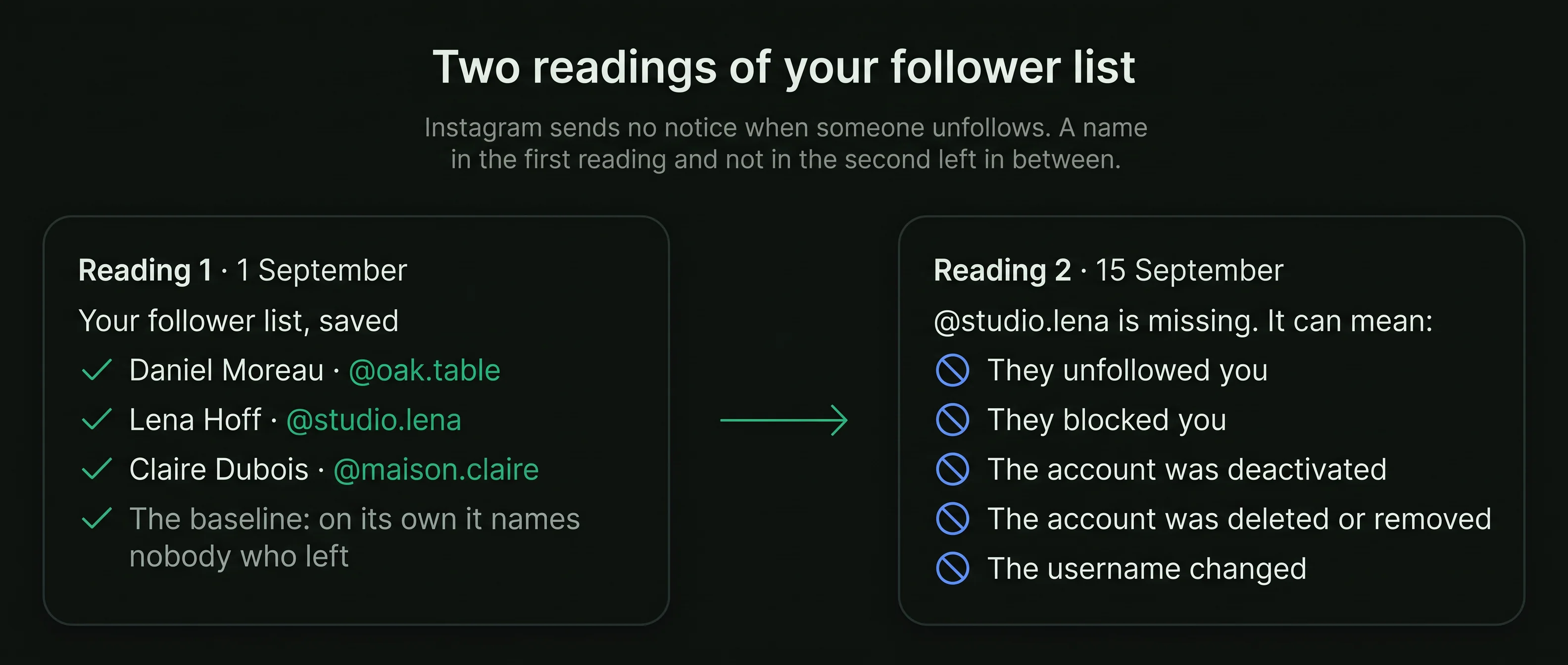
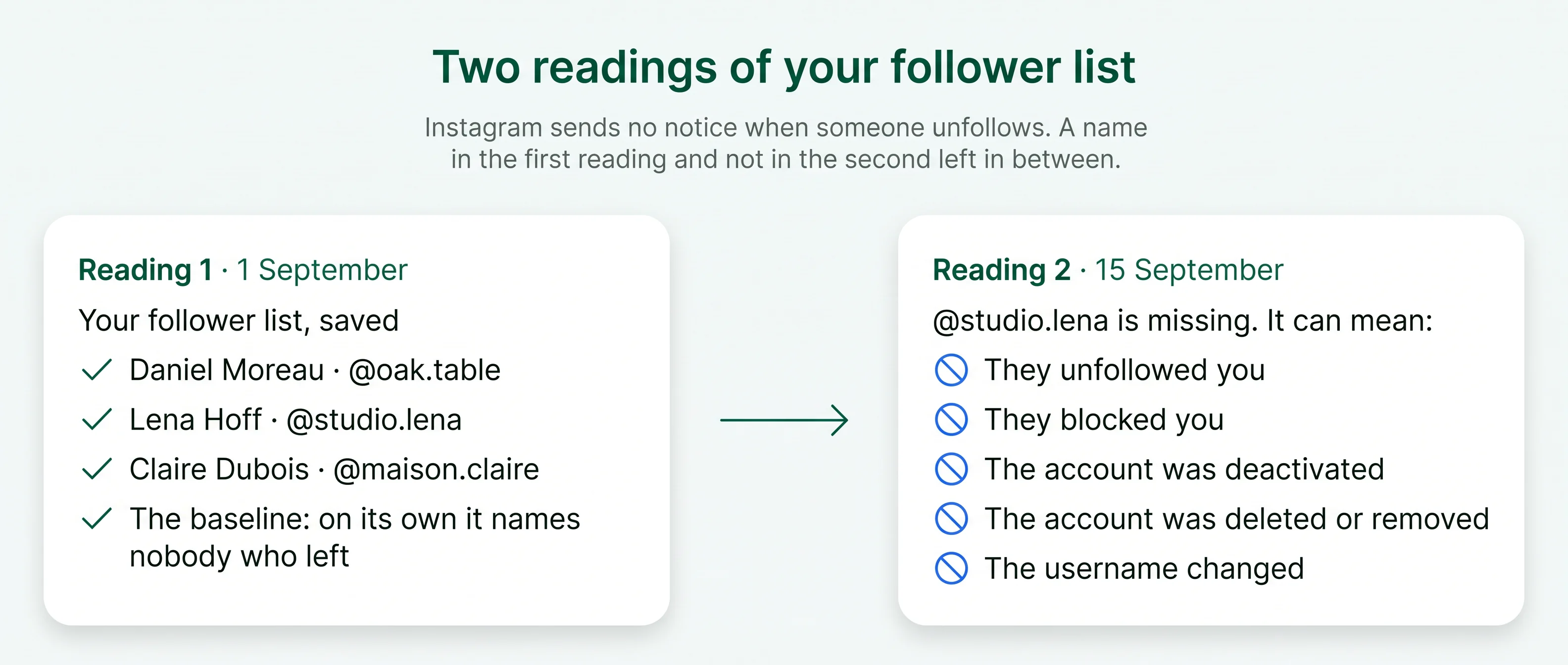
Compare two readings of your follower listInstagram sends no notice when someone leaves, and it keeps no list of past followers. Save your follower list, read it again later, and the names in the first reading that are missing from the second are the accounts that left in between.
Instagram announces new followers. An unfollow only shows as a count that is one lower.
A comparison of two readings names who left between them, and nothing before the first.
A missing name can also mean a block, a deactivated account or a new username.
Your username is all a comparison needs. Never give your password to any tool.
Instagram is open about arrivals and silent about departures. That gap is the whole reason people search for this.
If three people followed you this week and two left, your count rose by one. The count alone never tells you that anyone left at all.
A follower-list comparison is a simple idea. Its limits come from the same idea: it can only compare readings that exist.
Every account that follows you on that day is written down by username. This first reading is the baseline: on its own it names nobody who left. The other follower tools on this site start from the same kind of reading.
Instagram adds new followers to your list and removes the ones who leave, with no record of either kept for you.
Names in reading 1 and not in reading 2 left in between. Names in reading 2 and not in reading 1 arrived. Everyone else stayed.
The least that names anyone who left
Your own follower list, nothing else
Recoverable from before the first reading
The same method whichever way you take the readings. The only thing it asks of you is your public username and a second visit.
Type your own public Instagram username. No password and no login are needed, because your follower list is public.
Your full follower list is read and kept with today's date. This is the baseline every later reading is compared with.
A week or a month later, read the list again. The accounts missing from the new reading are the ones that left.
An unfollow is the most common reason, and not the only one. Before you act on a name, open the account and see which of these applies.
The account is still there and its profile opens as before, but the Follows you label on it is gone. The owner chose to stop following you.
A block removes the follow in both directions. The account no longer shows up when you search for it, and its profile no longer opens normally for you.
A temporarily deactivated account is hidden from every list until its owner logs back in. If the name returns in a later reading, this was the reason.
An account deleted by its owner, or removed by Instagram, leaves every list. Instagram removes automated and fake accounts, which can take several names off your list at once. Removed accounts are often automated, and an Instagram fake follower check estimates how much of a count they make up.
A comparison by username sees the old name leave and a new one arrive. If one left and one arrived on the same day, open the new one: it may be the same person. Accounts you follow that never followed you are a separate question, answered by a check of who does not follow you back.
When several accounts with no posts and no picture leave at the same time, Instagram clearing automated accounts is the likely reason, not a reaction to anything you posted. The bot followers guide shows what those accounts look like.
A comparison reads and reports. Everything that follows happens inside Instagram, done by you, one account at a time.
Tap the name to see which of the five reasons applies. A profile that opens normally without the Follows you label means an unfollow.
If you follow them and want to stop, unfollow from their profile. They are not notified.
Plenty of people trim who they follow from time to time. One unfollow is rarely about you.
If an account that left is now harassing you from another one, use Instagram's block and report options on its profile.
Instagram lets you download a copy of your information from Accounts Center. The download includes your followers and the accounts you follow. Request it on two dates, open the two follower lists, and look for the names that appear only in the first.
It takes longer than a tool, and it works on private accounts too, because the data comes from Instagram to you. The exact menu names change between app versions.
A private account still has a follower list. The difference is who else can read it.
Setting a private account to public opens your posts, stories and lists to everyone. Use the data download if you want to keep the account private and still compare readings.


Your follower list is public on a public account. A page that asks for your login is asking for your account, not your list.
Instagram keeps no record of who left before your first reading. A page that offers a full history has nothing to read it from.
Reading and comparing is all a comparison does. Unfollowing, removing and blocking stay in the app, done by you.
No. Instagram sends no notice for an unfollow in either direction.
A deactivated account leaves every list while it is off and comes back when its owner logs in.
No. Instagram has not documented the order of the follower list, and it carries no dates.
Short answers to what people ask when their follower count drops.
Type a public username and open the viewer. No Instagram login on your side, no name on theirs.


