

They never followed you
You followed them and they did not follow back. Many people follow back only accounts they know.
Two lists, compared: the accounts you follow and the accounts that follow you. This guide shows how the comparison works, how to tell a large account you follow for its posts from a person, and what to do in the app.

How do you see who doesn't follow you back on Instagram?
Compare your following list with your follower listEvery account on your following list that is missing from your follower list does not follow you back. Both lists are public on a public account, so the comparison needs only your username. Then sort the result into accounts you follow for their posts and people you know.
Instagram shows both lists and never compares them for you.
Names on Following and not on Followers do not follow you back.
Large accounts, shops and creators rarely follow back. That is expected.
Unfollowing sends no notice. Every decision is yours, made in the app.
Your profile header has a count for each list. Tap either count and the names open.
On the profile of an account that follows you, Instagram shows a Follows you label. Checking that label account by account is the slow way to the same answer. This check is one of the follower tools for your own account, and each of them starts from your username.
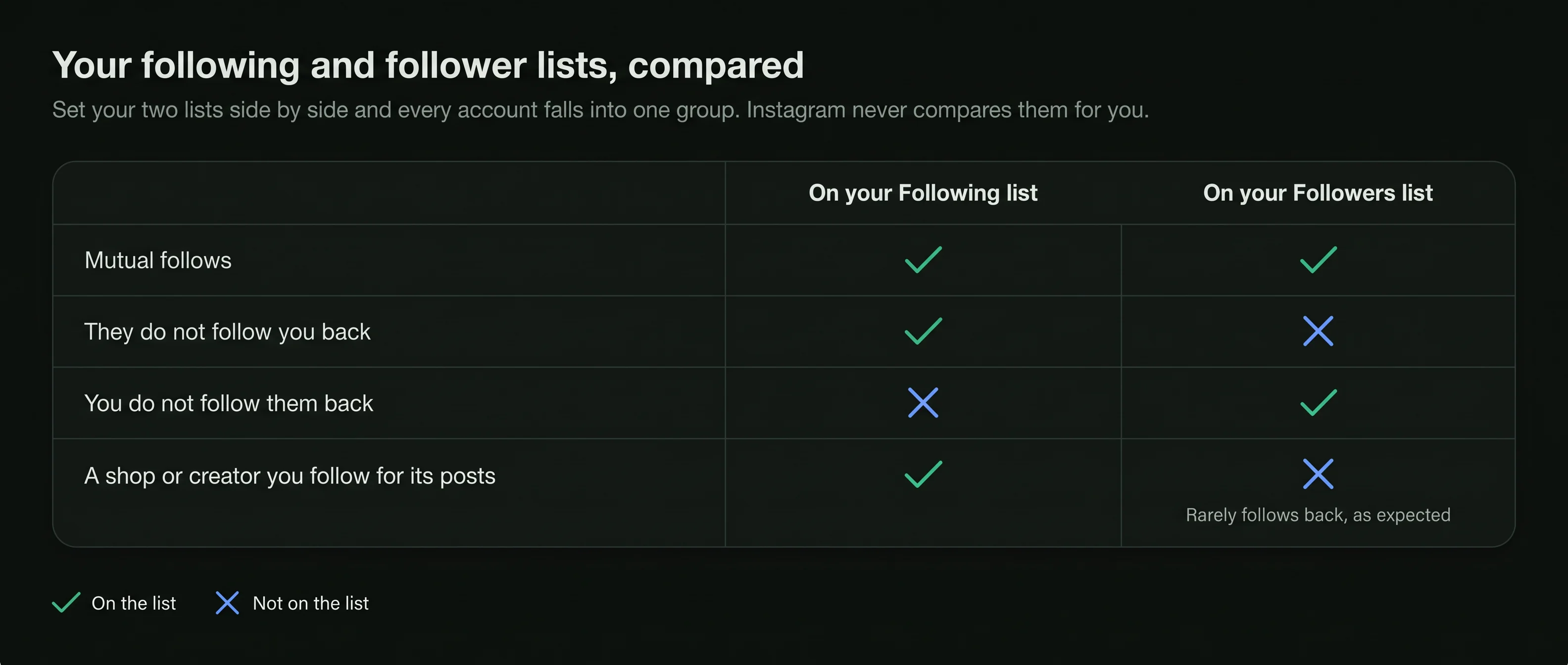
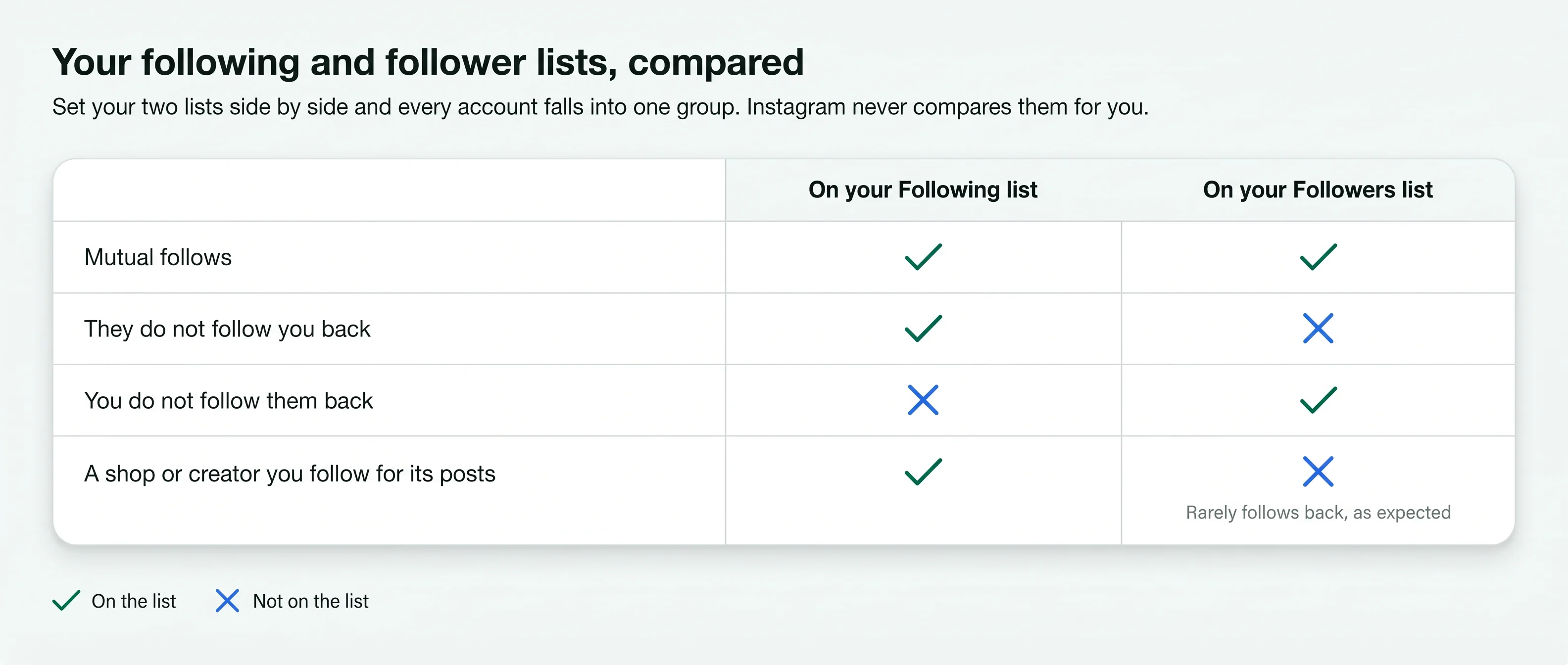
Set the two lists side by side and every account falls into one of three groups.
You follow them and they follow you. Friends, family, colleagues and accounts that followed back.
You follow them and they do not follow you. This is the list people search for.
They follow you and you do not follow them. Readers, customers, and accounts you may not know.
Following and followers, both public
Mutual, theirs only, yours only
Sent when you unfollow
Your username is the only thing you type. Both lists are read as Instagram shows them to anyone.
Type your own public Instagram username. No password and no login are needed.
Your following list and your follower list are read in full, as Instagram shows them publicly.
The accounts you follow that are missing from your followers are listed, with each one's own counts.
The not-following-back list mixes two kinds of account. They call for different decisions.
An account followed by many and following few is almost always one people follow for its content. Setting those aside leaves a much shorter list of people. Followers that are not people at all are marked on the Instagram bot followers page.
A name on the list is a fact about two lists, not a message. These are the common reasons behind it.
You followed them and they did not follow back. Many people follow back only accounts they know.
They followed you once and stopped. The who unfollowed me guide shows how two readings name who left and when.
Some people have an account and almost never use it. Your follow request or follow may be sitting unseen.
Some people follow only close friends and family, and follow back nobody else.
A deactivated account leaves every list while it is off and returns when the owner logs back in.
The list reads and reports. Each choice below is a tap you make in Instagram.
Open the profile and tap Following, then Unfollow. No notice is sent.
Mute their posts or stories to keep following without seeing them. They are not told.
If you follow them for their posts, a follow back was never the point.
If it is a person you know, a message may do more than an unfollow.
Instagram limits activity that looks automated. Unfollowing a long list in a few minutes can trigger a temporary limit, so spread it over several sessions. Before paying an account for a post, an Instagram fake follower check estimates how much of its count is real.
Instagram lets you download a copy of your information from Accounts Center, and the download includes your followers and the accounts you follow. Open both lists and look for names that appear on your following list only. Comparing two readings of the follower list in the same way shows who unfollowed you.
It works on private accounts as well, because the file comes from Instagram to you. The exact menu names change between app versions.


Both lists are public on a public account. A page that wants your login wants your account, not your lists.
An app that unfollows for you signs in as you, and Instagram limits activity that looks automated.
The comparison reads and reports. Unfollowing, muting and messaging stay in the app, done by you.
No. Until a private account approves your request, you are not on its follower list, and it is not on your following list.
No. Reading your own lists, or opening a profile, sends no notice to anyone.
People follow, unfollow and deactivate all the time. Each reading shows the lists on that day.
Short answers to what people ask when they compare who they follow with who follows them.
Type a public username and open the viewer. No Instagram login on your side, no name on theirs.


