Viewers / Posts

Instagram comments viewer

Read the comments under a public Instagram post without an account of your own: the replies under each one, why some comments are hidden or limited, and what the owner and the commenters can see.

  • No login
  • Replies included
  • Public posts only
A café table with two people talking over coffee
Comments · maison.claire

maison.claire Sunday lunch on the terrace.

  • emma.carter Is the terrace open on Sundays?

    2 h · 1 reply
    Pinned
  • maison.claire From 10 until late.

    1 h
  • J

    jonas.berg Booked for four, see you then.

    40 m
Reading leaves no name18 comments

Can you read Instagram comments without logging in?

Yes, on public posts

The comments under a public post are public, along with the replies under each one. An Instagram comments viewer opens them in the browser with no login, and reading them is not recorded for the owner or for the people who wrote them.

Key points
  1. 1

    Every comment carries its writer's username, on public and private accounts alike.

  2. 2

    Replies sit under the comment they answer and open from it.

  3. 3

    The owner decides who may comment and can hide, limit or delete comments.

  4. 4

    Comments on a private account's posts are closed to everyone the owner has not approved.
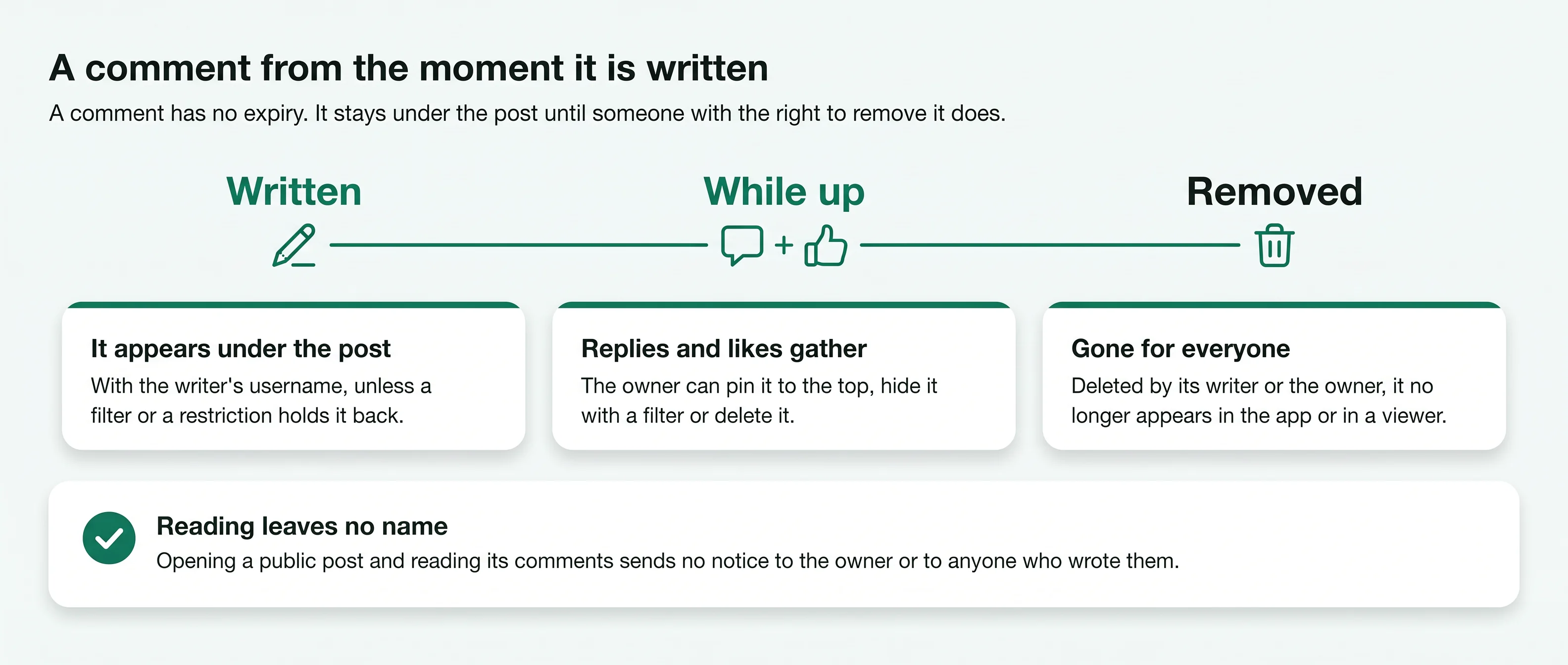
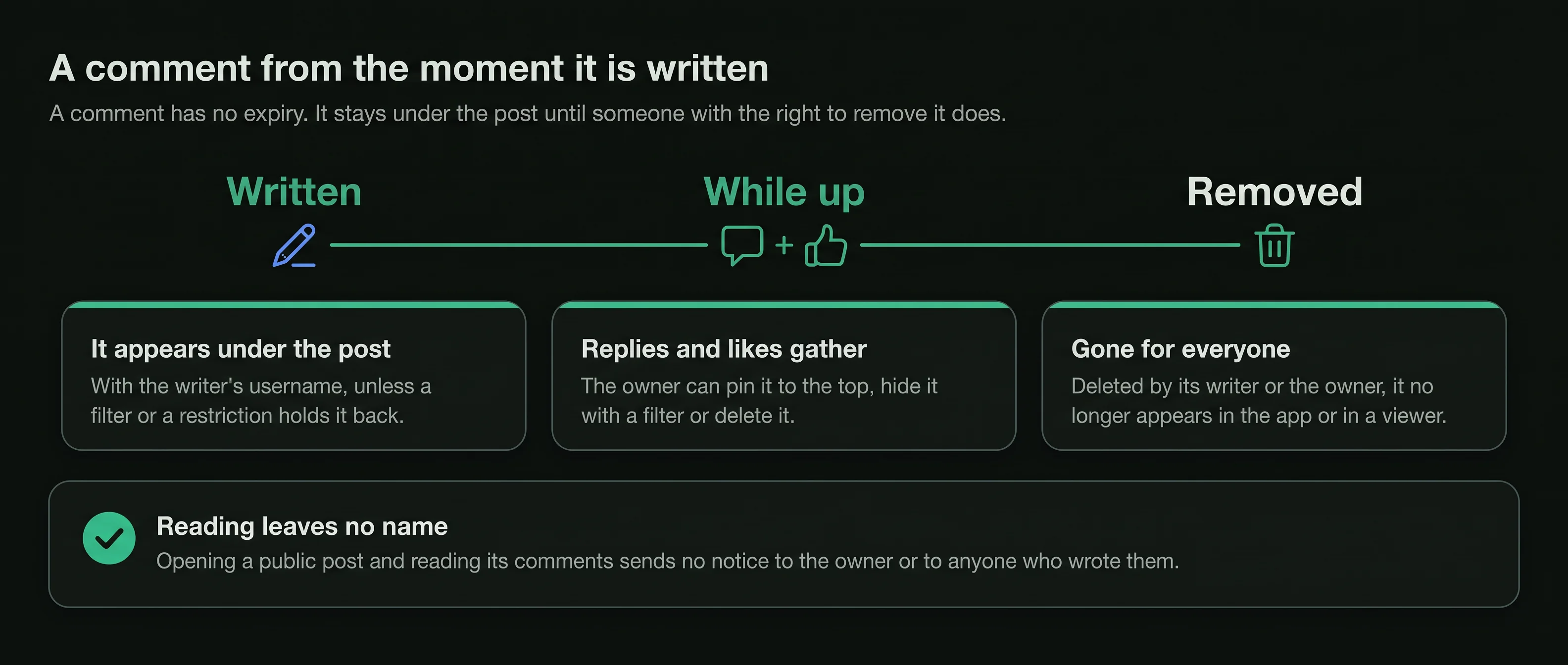
Timeline of an Instagram comment: written with a username, replies gather, then removed for everyone; reading is silent
What happens to a comment under a public post, from the moment it is written until it is removed. Free to share with a link to this page.
What you can read

Everything in the conversation under a public post.

An Instagram comments viewer opens a public post the way the app shows it to any visitor, with the conversation beneath it.

Handwritten-free note cards pinned to a cork board

The comments

Each comment with its writer's username and profile picture, in the order Instagram shows them.

Pinned comments

An owner can pin comments to the top of the list. Those stay first, above the rest of the conversation.

The replies

Replies sit under the comment they answer. Open them to read the thread, including the owner's own answers.

The caption

The owner's caption with its hashtags and mentions, which is often where the question in the comments began.

The comment count

How many comments the post has, shown beside the like count unless the owner hid that number.

No record of the read

Opening the post and scrolling through its comments sends no notice to the owner or to any commenter.

How it works

Read a post's comments in three steps.

The same on a phone, a tablet or a computer, with no Instagram login.

  1. 1

    Type the public username

    Enter the handle of the account whose post you want to read. The viewer needs that and nothing else.

  2. 2

    Open the post

    The profile opens with its grid of posts. Tap the photo, carousel or reel whose comments you want.

  3. 3

    Read the comments

    The comments load under the post. Open the replies under any comment to follow the thread.

The owner's controls

Why a post can show fewer comments than you expect.

The owner of an account has several settings over the comments on their posts. Each one changes what every visitor sees, a viewer included.

One thread, five states
  • emma.carter Do you take bookings for twelve?

    Pinned by the owner · shown first
    Pinned
  • lena.hoff The oat milk flat white is lovely.

    Shown to every visitor
    Shown
  • Caught by a word filter

    Hidden from the list visitors read
    Filtered
  • From a restricted account

    Shown only to that account
    Restricted
  • A comment its writer removed

    Gone for everyone
    Deleted
  1. Comments turned off

    The owner can switch comments off on a post when it is shared or later. The post then shows no comments and no box to write one.

  2. Who may comment

    An account can allow comments from everyone or only from some people, such as its followers or the accounts it follows. Everyone else cannot comment.

  3. Filtered words

    An owner can filter comments that contain offensive words or words they choose. Comments caught by the filter are hidden from the list that visitors read.

  4. Restricted accounts

    When the owner restricts an account, its new comments are shown only to that account unless the owner approves them. Nobody else sees them.

  5. Deleted comments

    The owner can delete any comment on their own post, and a writer can delete their own. A deleted comment is gone for everyone.

Limits during a busy moment

Instagram also lets an account limit comments for a while from accounts that do not follow it or followed it only recently. Those comments are hidden from the post while the limit is on. Whether an account follows the owner shows on the public follower list, which an Instagram follower viewer opens.

What a viewer shows

A viewer shows the comments that the post shows a visitor at the moment you open it. It cannot bring back a hidden, restricted or deleted comment, and it does not need to. Comments under a video read the same way, with the video playing in the Instagram video viewer.

Visible and not

What a visitor can and cannot read around a post.

The privacy setting of the account decides most of it. A few things stay private on every post.

Post on a public accountPost on a private account
Comments and repliesShown unless turned offClosed
Writer of each commentUsername and pictureClosed
Pinned commentsShown firstClosed
Comments a filter hidNot shown to visitorsNot shown to visitors
New comments from a restricted accountShown only to that accountShown only to that account
Deleted commentsGone for everyoneGone for everyone
Who read the commentsNot recorded for anyoneNot recorded for anyone
Comments on a private account stay closed.

A private account's posts, likes and comments are shown only to followers the owner approved. A site that offers to open them is not telling the truth.

Reading and writing

Reading leaves no name. Writing always shows yours.

Opening a post and reading its comments leaves no name on the owner's side, and the people who wrote the comments are not told either. Every action that adds something to the conversation is different: it is made from an account, and that account's name goes with it.

A comment notifies the owner. A reply notifies the person you answered. A mention notifies the account you named. A like on a comment shows the writer who liked it. Comments sent during a live broadcast show the host your name at once, as the Instagram live viewer page explains.

Your name shown to someone
Opening the postNo
Reading the comments and repliesNo
Writing a commentYes, to the owner and every visitor
Replying to a commentYes, to the writer you answered
Liking a commentYes, to the writer
Mentioning an accountYes, to the account you named
A comment over time

What happens to a comment after it is written.

A comment has no expiry. It stays under the post until someone with the right to remove it does.

  1. 1
    When it is written

    It appears under the post

    The comment shows with the writer's username and picture, unless a filter or a restriction holds it back. The owner gets a notification naming the account.

  2. 2
    While the post is up

    Replies and likes gather under it

    Other accounts can reply under the comment or like it. The owner can pin it to the top, hide it with a filter or delete it.

  3. 3
    If it is removed

    It leaves the post for everyone

    A comment deleted by its writer or the owner is gone. A viewer shows the post as it is when you open it, so the comment no longer appears.

1 username

Beside every comment and every reply

0 names

Of the people who only read

0 notices

Sent when someone reads the comments

Someone's comments

Why there is no list of the comments one person wrote.

A comments viewer works from a post outwards. The other direction, every comment one account has left, is closed.

Kept for the account itself

An account's own comment history is shown only to that account, in its activity settings.

One post at a time

The only public trace of someone's comment is the comment itself, under a public post. There is no page that gathers them.

Private commenters still show

A private account that comments on a public post appears beside its comment with its name and picture. Its own posts stay closed.

Promises to the contrary

A site that offers every comment a person has ever written has no list to read it from. Leave it.

Who uses it

Four ordinary reasons to read the comments.

Claire DuboisSizes before buying
Example
The situation
Claire wanted a jacket from a small label and did not know how its sizes ran.
What they did
She read the comments under the label's public posts, where customers had asked about fit, and ordered from the answers the label gave there.
Emma CarterOpening hours
Example
The situation
Emma was planning a Sunday lunch, and a restaurant's website did not say whether its terrace opened that day.
What they did
She found the question already asked under the restaurant's latest post, with the owner's reply beneath it.
Daniel MoreauReading his market
Example
The situation
Daniel runs a café and wanted to know what people in his town asked a new bakery nearby.
What they did
He read the comments on the bakery's public posts once a week and noticed the same request for oat milk coming up again and again.
Lena HoffHer choir's concert
Example
The situation
Lena has no Instagram account. Her choir posted a concert announcement and people asked about tickets underneath.
What they did
She opened the post in her browser and read the replies the choir had given, then passed the answer on to her neighbour.
Is it right for you

Good for, not for.

A comments viewer is good for

  • Reading the comments and replies under a public post, with no login
  • Finding answers the owner already gave in the comments
  • Checking that the comments on an account come from real people
  • Reading pinned comments the owner put first

It is not for

  • Showing comments the owner hid, limited or deleted
  • Reading comments on a private account's posts
  • Listing every comment one person has written
  • Commenting, replying or liking a comment
Stay safe

Three rules for any comments viewer.

  1. Never type your Instagram password

    A comments viewer works from a public username. A page that asks for your Instagram login is after your account.

  2. Hidden-comment promises are false

    No site can show comments an owner deleted, or comments on a private account. A page that offers them wants a survey, an install or a payment.

  3. Leave the conversation to the app

    Reading is all a viewer does. Commenting, replying and reporting a comment stay in the app, from your own account.

Quick answers

Smaller questions about comments.

Do comments on reels open the same way?

Yes. A reel's comments sit under it like any post's, with the replies under each comment.

Why does the count not match what I can read?

The count can include comments that a filter or a restriction keeps from visitors, so the list you read may be shorter.

Does the order of comments mean anything?

Pinned comments come first because the owner chose them. Instagram has not documented how it orders the rest.

Last reviewed 4 October 2026Facts checked against Instagram's own help pages

What changed
  • New page: reading the comments and replies on a public post with no login
  • Why some comments are hidden, limited or gone, and what the owner and the commenters see
Questions

About comments.

Short answers to what people ask before they use an Instagram comments viewer.

01Can I read Instagram comments without an account?
Yes, on public posts. An Instagram comments viewer opens a public post in the browser with its comments and the replies under them, with no login.
02Will anyone know I read the comments?
No. Reading a post or its comments is not recorded for the owner or for the people who wrote the comments, whether you are signed in or not.
03Why are there no comments on a post?
The owner can turn comments off on a post. When they do, there are no comments to read, in the app or in a viewer.
04Why do some comments seem to be missing?
The owner can filter comments by words, limit who may comment, restrict an account so its new comments show only to that account, or delete comments. A viewer shows what the post shows a visitor at that moment.
05Can I see comments on a private account's post?
No. The posts, likes and comments of a private account are shown only to followers the owner approved.
06Can I see deleted comments?
No. A deleted comment leaves the post for everyone, and a viewer shows the post as it is when you open it.
07Can I see every comment someone has written?
No. Instagram shows an account's own comment history only to that account. Their name appears on the public posts they commented on, one post at a time.
08Does the owner see who commented?
Yes. Every comment is written from an account, and its username sits beside the comment for the owner and for every visitor.
09Can I reply to a comment without an account?
No. Replying, liking a comment and commenting all need an account, and each one shows that account's name.
10Is this site part of Instagram?
No. ProfileScanner is an independent guide and is not affiliated with Instagram or Meta.
11Does PeekViewer show comments on public posts?
Its home page lists comments on public posts, who left them and the replies, collected into its dashboard after a wait. The PeekViewer review on this site covers what it costs.
Ready when you are

Look first. Stay unseen.

Type a public username and open the viewer. No Instagram login on your side, no name on theirs.

A woman relaxing on a sofa, looking at her phone
Open the viewer