


Does it play a run you know?
Type a public account that posted several stories today, and check they play in order.
An account can post several stories in a day, and they play as a run, oldest first. How to move through them, what skipping does, what a reply or a reaction tells the owner, and how to choose another viewer when one stops loading.


What can you use when StoryNavigation is not loading?
Another viewer that plays the run in orderA browser viewer lays out a public account's live stories in posting order, from a username, with no login. You can open any one of them, and no story gets your name. Replies, reactions and likes are the parts that need an account, and each one shows your name to the owner.
StoryNavigation is one of the names people search for when they want to move through public stories without an account.
Each story in a run is separate, with its own 24 hours and its own viewer list.
This page covers story viewers of this kind in general and cannot report any site's current status.
ProfileScanner is independent and not affiliated with StoryNavigation, Instagram or Meta.
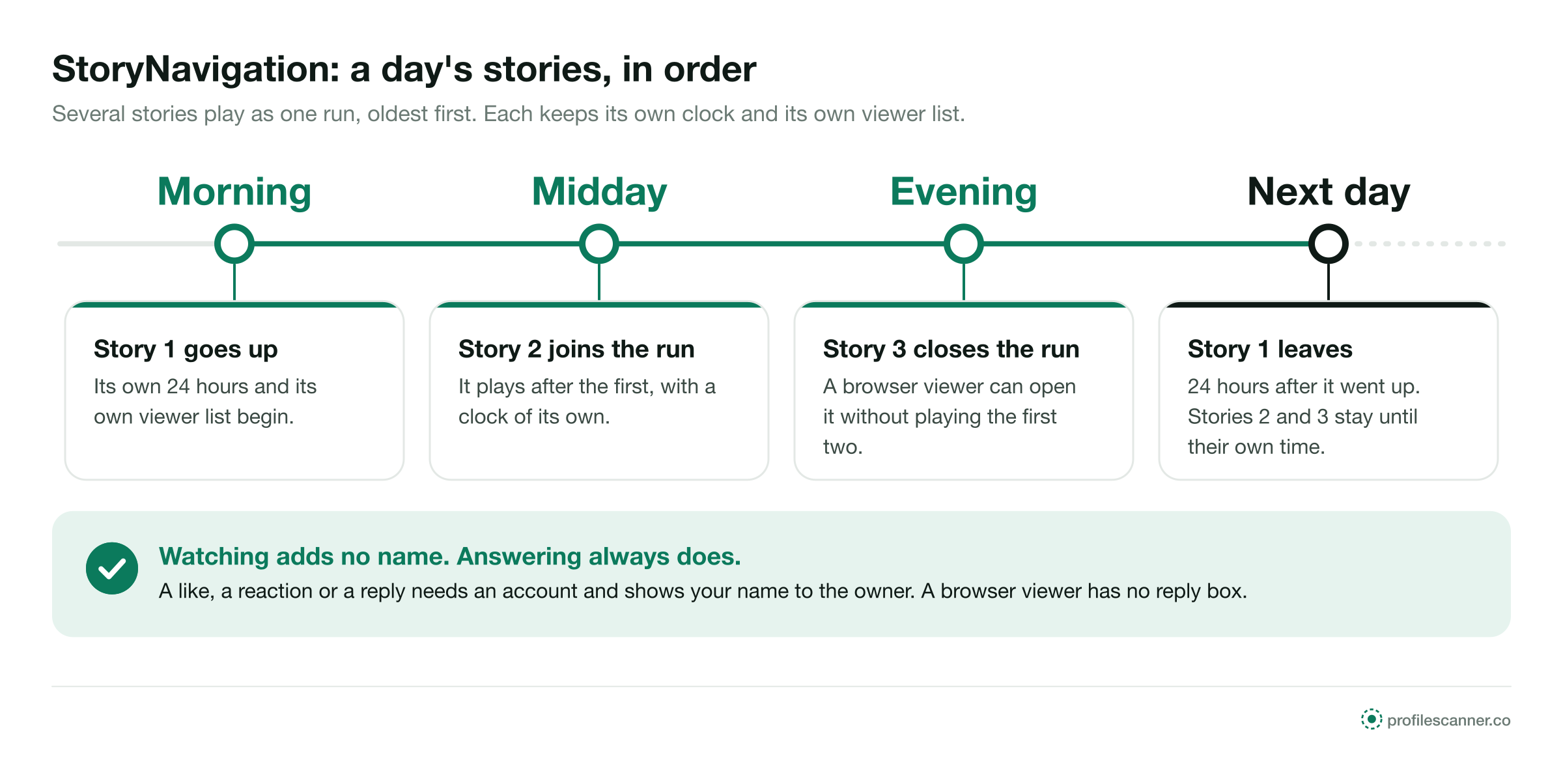
When an account posts several stories, Instagram plays them oldest first, as one run. Each one still keeps its own clock.
It starts its own 24 hours. On a public account, a viewer plays it from the username.
It plays after the first, with its own 24 hours and its own viewer list.
All three play in posting order, oldest first, until each one's 24 hours are up.
It leaves 24 hours after it was posted. The later ones stay until their own time, unless saved to a highlight.
Each story's own time on the profile
Each story's viewer list stays open
Per story, not per run
A story can be answered in several ways. Each one needs an Instagram account, and each one shows that account to the owner.


A browser viewer has no reply box and no reaction button tied to you. To answer a story, open it in Instagram, signed in, and accept that your name goes with it. Sites that ask you to sign up before they show a story are compared on the Inflact alternative page.
In the Instagram app, a tap on the right side of a story moves to the next one, a tap on the left goes back, and holding pauses. Each story you open while signed in adds your name to that story's list, even if you leave it after a moment. A story you never open adds nothing.
A browser viewer works from the other end. It lays the live stories out in posting order, so you can open the third without playing the first two, and none of them gets a name, because no signed-in account opened them. Keeping a copy of a story, as opposed to watching it, is covered on the StoriesIG alternative page.
The same with any sound viewer, on a phone or a computer.
Type the public account's handle. No email address and no Instagram password.
The live stories appear in posting order, each with how long ago it went up.
Play the run from the start or open one story on its own. None of them gets a name.
Rule out the account and the clock before the site.
Confirm the current username from the person's or the business's own website or card.
A lock in the header means private. No viewer plays its stories.
The first story in a run leaves first. A run that looks shorter may have lost its oldest story.
Type a public account you know posts stories. If its run fails too, switch viewers.
These reasons apply to story viewers as a group. None of them is a statement about StoryNavigation or any other single site.
Instagram limits automated access to its pages. When it blocks the way a viewer loads stories, the run stops loading, sometimes after the first story, until the viewer changes its method.
Instagram caps the requests from one source in a set time. A run of several stories means several requests, and a busy viewer can reach the cap part way through.
A viewer can move to a new domain. Old links may lead to an error or to other content.
Heavy traffic can stall a viewer between stories, then it recovers when fewer people use it.
Each answer is on the first screen. A viewer that answers all five well is built for public stories.
Type a public account that posted several stories today, and check they play in order.
It should not. No email, no phone number, no account of your own.
Never. A password field on a viewer page collects accounts.
It should run in the browser, with no app and no extension.
It should say private and Close Friends stories stay closed.
It should play the run in a phone's own browser.
Each one handles a run differently and shows the owner something different.
Each one asks for something a run of public stories does not need.
Every public story in a run plays from the username. A login that appears after the first story collects accounts.
A reply is a message from an account. A page that offers anonymous replies through a viewer is offering something Instagram does not do. Apps that promise to read messages are covered in the Glassagram review.
Those go only to accounts on the owner's list. No site can add them to a run.
Stories play in any phone browser. An app or extension adds nothing a run needs.
The same words appear on Instagram and on every viewer.
Each example is about a public account that posted several stories in a day.


ProfileScanner is an independent guide. It is not affiliated with StoryNavigation, Instagram or Meta. This page covers story viewers of this kind in general, cannot report any site's current status, and makes no statement about the safety or ownership of any other site.
Short answers to what people ask about moving through stories and answering them.
Type a public username and open the viewer. No Instagram login on your side, no name on theirs.


