

Windows and Mac
Any current browser on a desktop or a laptop opens it the same way.
Use an Instagram viewer online on a computer: public profiles, posts, reels and stories in your browser, with no app to install and no login, and how that compares with Instagram's own website.


Can you view Instagram online on a computer without logging in?
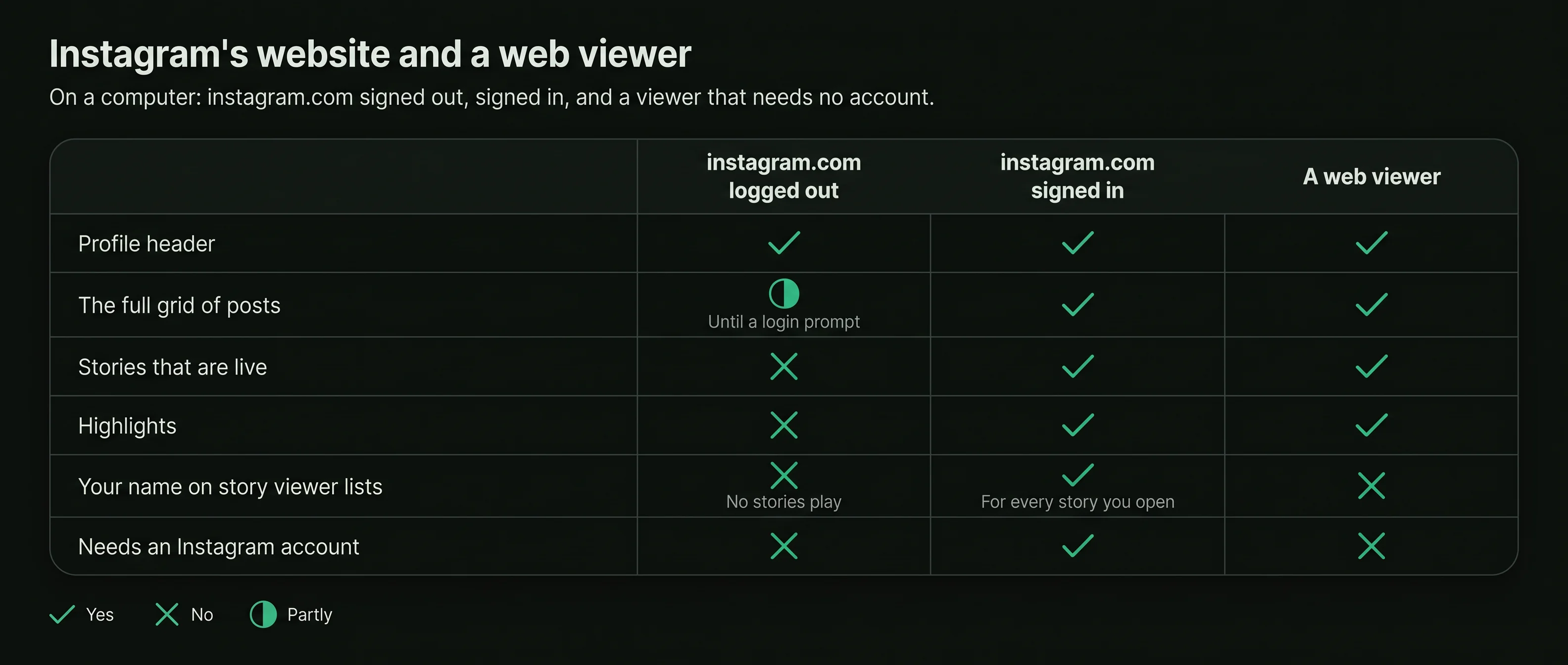
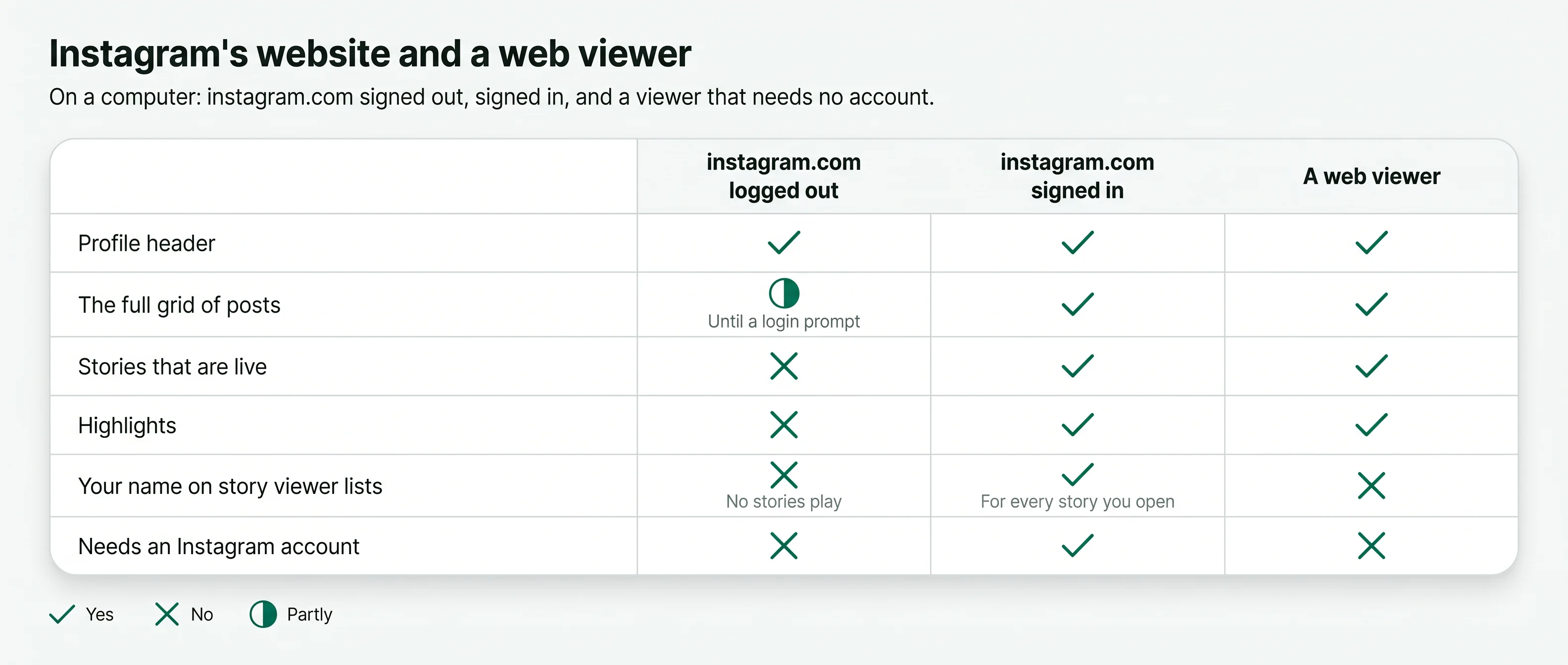
Yes, for public accountsInstagram's website shows a logged-out visitor a little of a public profile, then asks for a login, and plays no stories. An Instagram web viewer opens the whole public account in the browser from its username, with no app and no login.
A web viewer runs in any current browser, on any computer.
Logged out, Instagram's website stops at a login prompt and plays no stories.
Signed in on the website, your name goes on the story viewer lists you open.
Private accounts show their header only, on a computer as on a phone.
An Instagram web viewer is an Instagram viewer online: a page you open in the browser you already use. You type a public username and the profile opens in the tab, with its picture, bio, grid, highlights, reels and the stories that are live.
Nothing is installed and no Instagram account takes part, so there is no login screen and no prompt partway through the grid. On a large screen the profile picture viewer shows the picture at the size it was uploaded.

Wood-fired breakfasts and long lunches by the harbour.


Any browser, any computer, with no Instagram login.
Enter the handle of the account you want to see. The box takes a username and nothing more.
The public profile opens in your browser tab with its header, highlights and the stories that are live.
Scroll the grid, open posts and reels, and play stories, with no prompt asking you to sign in.
Instagram's website behaves differently signed in and logged out. A web viewer sits between the two: no account, and the whole public profile. The follower and following lists open the same way in an Instagram follower viewer.
Signed in to Instagram's website, you use your own account, the same as in the app. Every story you open adds that account to the owner's viewer list.
When you want to look at a public account without your account behind the look, or without having an account at all.
It is a page in a browser, so it runs wherever a current browser does.
Any current browser on a desktop or a laptop opens it the same way.
No app store and no download are involved, so these computers work as well as any other.
The same page fits a smaller screen, so you can start on a phone and carry on at a desk.
A private or incognito window keeps the visit out of the browser's history on that computer.
Nothing is installed and no account is signed in, so nothing is left on the computer but its browser history.
No app, no download and no browser extension. Close the tab and it is gone.
A larger screen makes captions, menus and price lists easier to read. These habits make the most of it.
Press Ctrl and the plus key, or Command and the plus key on a Mac, to make small text in a story or a caption larger.
Stories move on by themselves. Pause on the one with the menu, the timetable or the price list and read it at your own speed.
Open two public profiles side by side, such as two hotels or two shops, and compare their posts without switching apps.
Reels and videos play in the browser. Turn on the sound when you want the audio, and keep it off in an office.
Note the exact usernames you look at often, so a misspelled handle never leads you to a different account.


The owner of the account keeps nothing about your visit: profile visits are not recorded, and a story played through a viewer adds no name to the viewer list. Instagram receives a request with no account on it.
Your own computer is the one place a trace stays, in the browser history, as for any website you open. A private window leaves that out as well.
Some pages offer an extension to view or save Instagram content. A web viewer needs none.
An extension that works on Instagram usually asks to read and change the pages you visit. That is far more than looking at a public profile needs. Extensions that promise to show who unfollowed you ask for the same access, while the comparison needs only your username.
A public profile, post or story is a web page. Any current browser opens it with no add-on.
If you installed an extension for Instagram and no longer use it, remove it from the browser's extensions page.


A web viewer needs a public username and nothing else. A page that asks for your Instagram login is after your account.
No download, app or extension is needed to view a public profile on a computer. A page that insists on one wants permissions.
Any viewer with paid plans should show them on screen before you enter payment details.
No. A viewer never uses your Instagram session, so being signed in elsewhere in the browser changes nothing.
Yes, as any tab. Reload it to see stories that went up since you opened it.
Yes. Nothing is installed and no account signs in. Use a private window and close it when you finish.
Short answers to what people ask before they use an Instagram web viewer.
Type a public username and open the viewer. No Instagram login on your side, no name on theirs.


