


Rate limits
There is a cap on the requests one source can make in a set time. A busy viewer can reach it in the evening and show empty story circles until the window resets.
Watching a story and keeping a copy of it are different things, and both run against the same 24-hour clock. What that clock means, why story viewers of this kind stop loading, and how to choose another one while the story is still live.


What can you use when StoriesIG is not loading?
Another story viewer, while the story is liveA browser viewer plays public stories and highlights from a username, with no login, for as long as the story is on the profile. Check the account is public and the story is under 24 hours old, then try a second viewer that asks for nothing else.
StoriesIG is one of the names people search for when they want to watch or keep public stories without an account.
Watching plays a story while it is live. Keeping a copy is a separate step, and the content stays the owner's.
This page covers story viewers of this kind in general. It cannot report any site's current status.
ProfileScanner is independent and not affiliated with StoriesIG, Instagram or Meta.
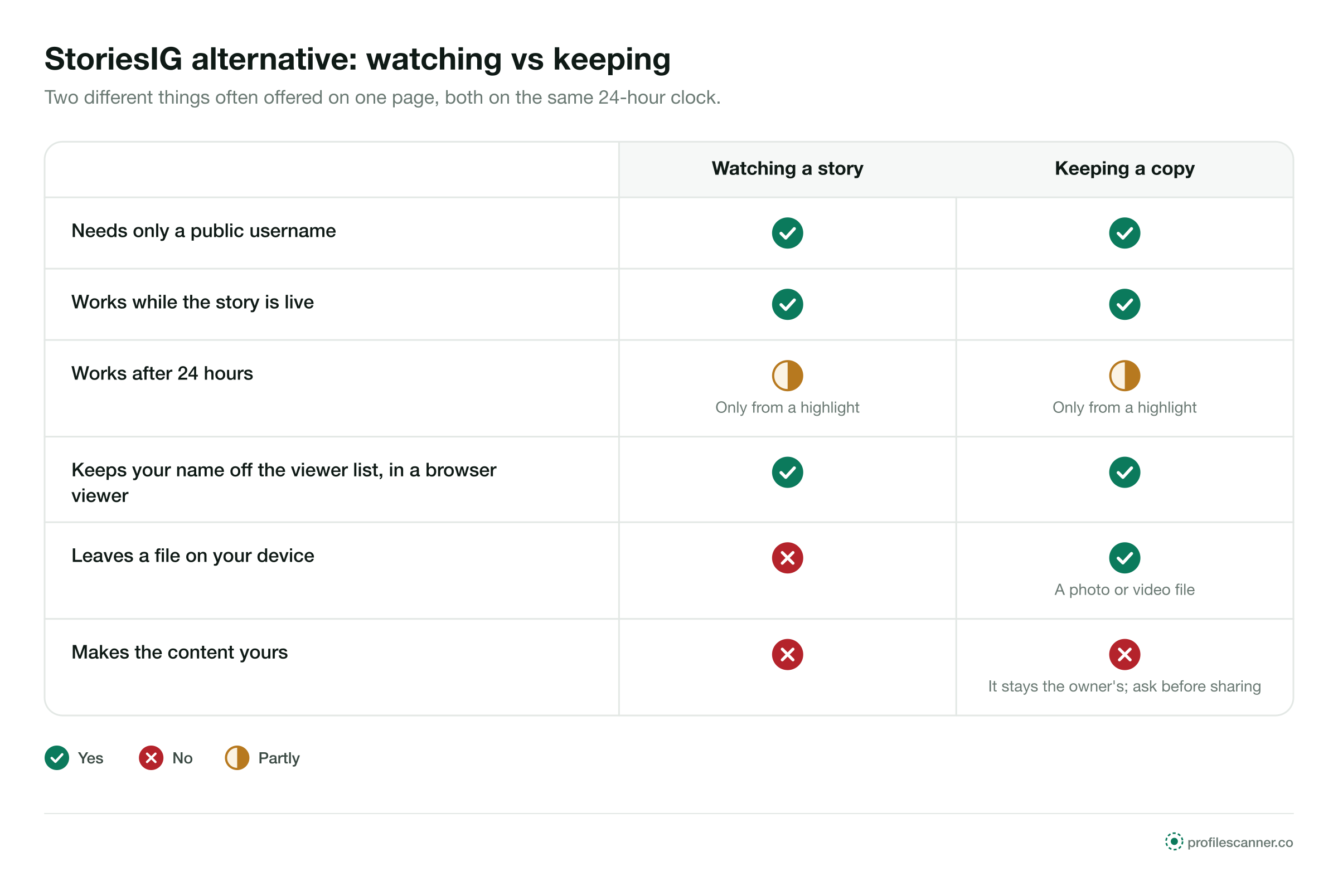
Many story viewers offer a play button and a save button side by side. They do different things, and only one of them is needed to see a story. Moving through several stories in a row is covered on the StoryNavigation alternative page.
A shop's opening hours, a venue's set times, a ferry's weather notice: many stories people look up are read once and done with. A copy adds a file to your phone and nothing to what you learn.
Every story runs on the same clock. Choose a stage to see what a viewer can play at that point.
Any viewer plays it from a public username.
The story has left the profile; the list of signed-in viewers has not.
Saved under the bio, or gone.
On a public account, any sound viewer plays it from the username, in posting order.
Each signed-in account that opens it is added. A browser viewer adds no name.
Some viewers offer to keep one. The story leaves the profile on time either way.
Private and Close Friends stories go only to approved accounts.
It is gone from the profile. No viewer can play it from there.
If the owner saved it under the bio, it plays from there until they remove it.
Owners keep their own past stories in an archive that only they can open.
The owner can read the viewer list until 48 hours have passed.
The owner can no longer read who watched that story.
Saved highlights play for anyone on a public account.
Posts, reels and the header remain for any viewer to open.
A browser viewer never added one, so there was nothing to read.
A story stays on the profile
The owner can read the viewer list
Keeps a story under the bio
The same with any sound viewer. Nothing in these steps asks for an account, a password or an install.
Type the public account's handle. No email address and no Instagram password at any point.
Live stories sit in the circle at the top; saved ones sit under the bio as highlights.
The story plays in order. The owner's viewer list gets no name, because no signed-in account opened it.
Most empty results come from the account or the clock. These take a minute.
Confirm the current username on the person's or the business's website.
A lock in the header means a private account. No viewer plays its stories.
If nothing went up in the last 24 hours, the circle is empty. Look in the highlights.
If the account is public with a live story, type the same username into another viewer.
These apply to story viewers as a category. This page makes no statement about StoriesIG or any other single site.
There is a cap on the requests one source can make in a set time. A busy viewer can reach it in the evening and show empty story circles until the window resets.
Instagram limits automated access to its pages. A viewer that plays and saves many stories is the kind of traffic it limits, and when it blocks the route, stories stop loading until the viewer changes how it works.
A viewer can move to a new domain. Bookmarks and old search results keep pointing at the previous one.
When many people use a viewer at the same time, stories can buffer or fail, then play again once traffic falls.
Each check can be made on the first screen, in less time than a story takes to play. A viewer that passes all five is built for public stories. A page that fails one is a page to close. Paid apps that promise more than public stories are covered in the Glassagram review.
Test it with a public account that posts stories often, so you can see straight away whether it plays the right ones.
Each kind gives up something different. Against a 24-hour clock, these are the differences that count.
Each one wants something from you. None of them is needed to watch or keep a public story.
A public story needs no login. A password field on a viewer page collects Instagram accounts.
Once a story leaves the profile, only a highlight keeps it. A page offering last week's stories from an account with no highlights has nothing to show. The Mollygram alternative page covers what to check while a story is still up.
A browser plays and saves public stories on any phone. An installer adds permissions you do not need.
Those reach approved accounts only, so no site has them to play or save.
Each example is about a public account and a story that would not wait.


ProfileScanner is an independent guide. It is not affiliated with StoriesIG, Instagram or Meta. This page covers story viewers of this kind in general, cannot report any site's current status, and makes no statement about the safety or ownership of any other site.
Short answers to what people ask about watching and keeping public stories.
Type a public username and open the viewer. No Instagram login on your side, no name on theirs.


